
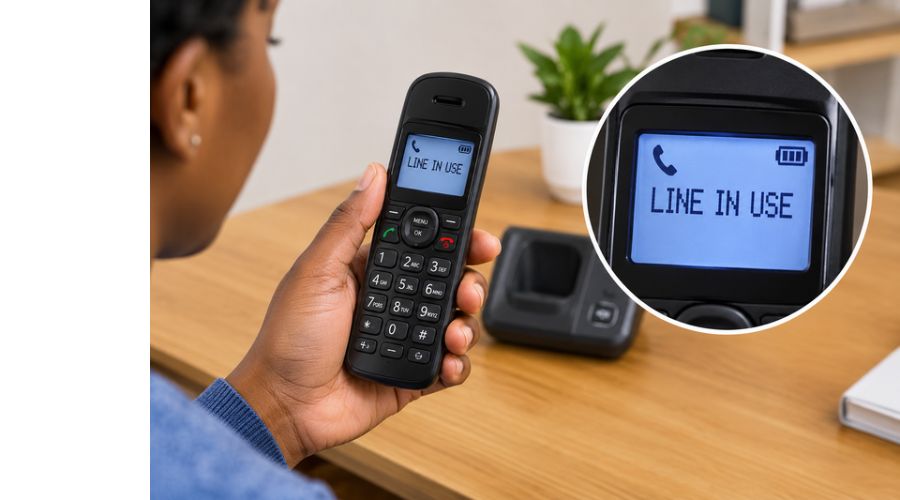
Seeing a “Line in Use” message on your cordless phone when nobody is calling can be frustrating, especially when you cannot make or receive calls. In most cases, the message means the phone system detects an active telephone line, which may be caused by another handset, an extension phone, or the base unit being in use.
However, if every phone is idle, the message may point to a faulty telephone connection, a temporary line-voltage issue, or a problem with your VoIP adapter.
The good news is that you can often fix the problem without replacing your cordless phone.
In this guide, you’ll learn why your cordless phone says, “Line in Use,” how to clear the message and what to check if it keeps appearing after you hang up or restart the system. These troubleshooting steps apply to many Panasonic, VTech and AT&T cordless phones, although the exact instructions may vary by model.
Read on.
Also Read:
What to Do When Your Cordless Phone Says Line in Use
If your cordless phone says “Line in Use” when nobody is on a call, start by checking whether another handset or telephone connected to the same line is active. If every phone is idle, inspect the telephone cables, restart the base unit and test whether the problem affects other phones. The message usually means your phone system detects an occupied line, but it can also appear because of a connection fault or a problem with your telephone service.
Follow these troubleshooting steps to identify the cause and clear the message without unnecessarily replacing your phone.
Check Whether Another Handset or Extension Phone Is in Use
The first thing to do when your cordless phone displays “Line in Use” is to check every handset registered to the same base unit. If another handset is making a call, has not disconnected properly, or has its speakerphone active, the base may continue to report that the telephone line is occupied.
Also check any wired extension phones connected to the same telephone line. Some cordless systems can detect when another connected phone goes off hook, even if that phone is not part of the cordless system.
How to fix it:
- Check all handsets and confirm that none is on a call.
- Press the End or Off button on each handset to terminate any lingering call.
- Check the base unit for an active speakerphone call.
- Hang up any wired extension phones connected to the same line.
- Wait a few seconds and check whether the “Line in Use” message disappears.
VTech confirms that its cordless phones may display this message when another handset, the base speakerphone, or another telephone on the same line is in use.
Disconnect and Reconnect the Telephone Line Cord
A loose or poorly connected telephone line cord can cause your cordless phone to behave as though the line is occupied. The cable may have become loose at the wall jack or the telephone base, or the cord itself may be damaged.
How to fix it:
- Unplug the telephone line cord from the back of the base unit.
- Disconnect the other end from the telephone wall jack.
- Check the connectors for visible damage, dirt, or bent contacts.
- Reconnect both ends firmly.
- Wait briefly, then check whether the message clears.
If possible, try another compatible telephone line cord. You can also connect the base to a known working telephone jack, if one is available. If the message disappears after changing the cord or jack, the original connection may be responsible.
AT&T’s troubleshooting guidance recommends checking the line connection, replacing a suspect telephone cord, and testing another working jack when a “Line in Use” indicator remains on.
Restart the Cordless Phone Base Unit
If no handset or extension phone is in use and the message remains on the display, restart the cordless phone base unit. A temporary electronic fault or an incorrect reading of the telephone line can sometimes cause the system to report that the line is occupied when it is not.
How to restart your cordless phone:
- End any active calls and switch off the handset if your model allows it.
- Unplug the base unit’s power adapter from the electrical outlet.
- Leave it disconnected for approximately 30 seconds to one minute.
- Reconnect the power adapter and allow the base unit to restart fully.
- Check the handset display and try making a test call.
If the problem continues, you can perform a more complete reset by disconnecting the handset batteries and the base power, where your model’s instructions permit. Wait a few minutes, reconnect everything and allow the handset to reconnect to the base.
Panasonic recommends briefly disconnecting the base unit’s power when its “Line in Use” message persists despite all handsets being idle. AT&T also documents a reset procedure involving the base power and handset batteries.
Important: Restarting the phone is not the same as performing a factory reset. Avoid factory-resetting the system unless necessary because some models may require you to restore settings or register handsets again.
Check Whether the Telephone Line Has a Dial Tone
Sometimes the “Line in Use” message is caused by a telephone line problem rather than the cordless phone itself. A disconnected, inactive, or faulty line may prevent the phone from determining whether the line is available.
To check whether the line is working, test it with another compatible telephone, if available.
Follow these steps:
- Connect another telephone to the same wall jack or telephone adapter.
- Lift the receiver and listen for a dial tone.
- If there is no dial tone, try a different known-working jack where available.
- If the second phone also fails, contact your telephone service provider to check the line.
- If the second phone works normally, reconnect your cordless phone and continue troubleshooting its base unit and cable.
You can also call your home number from a mobile phone to check whether incoming calls reach the cordless system. However, a successful incoming call does not necessarily prove that outgoing calls or the telephone line are functioning correctly.
AT&T notes that a line indicator can remain on when a line is disconnected, or inactive and Panasonic recommends testing the line with another phone when the message persists.
Restart Your VoIP Adapter or Wireless Home Phone Box
If your cordless phone connects through a VoIP adapter, fiber telephone terminal, router with a telephone port, or wireless home phone box, the problem may originate from that equipment rather than the handset.
These systems convert an internet or cellular connection into a telephone connection. A device may appear powered on while still experiencing a signal or voltage problem that prevents calls from working correctly.
How to fix it:
- Disconnect your cordless phone’s telephone cable from the adapter.
- Unplug the VoIP adapter or wireless home phone box from its power source.
- Wait approximately 30 seconds before reconnecting the power.
- Allow the device to finish starting up and reconnecting to the network.
- Connect the telephone base to the adapter’s designated TEL or PHONE port.
- Check for a dial tone and test an outgoing call.
If your cordless phone uses a router-based telephone service, follow your provider’s instructions before restarting the router or optical network terminal. Do not disconnect fiber cables or alter network settings unnecessarily.
AT&T specifically identifies VoIP equipment as a possible cause of a “Line in Use” message accompanied by a busy tone or no dial tone. Its troubleshooting guidance also warns that connecting the telephone cable to the wrong port can prevent calls from working.
Disconnect Other Devices Connected to the Same Telephone Line
If your cordless phone still says “Line in Use,” another device connected to the same telephone line may be causing the problem. This can include wired extension phones, fax machines, answering machines, or other telephone equipment.
Some devices can affect the electrical conditions on the telephone line, causing a cordless phone to detect incorrect use.
To investigate, temporarily disconnect other devices connected to the same line, leaving only your cordless phone’s base unit connected. Make sure you disconnect only telephone equipment, not unrelated networking or security equipment.
Next, wait a short time and check whether the message disappears. If the phone returns to normal, reconnect the other devices one at a time, checking the display after each connection. This can help identify the device or connection causing the issue.
If the message returns after reconnecting a particular device, check that device’s cable and setup. If the message persists with all other devices disconnected, the telephone line, wall jack, or cordless base may be responsible.
AT&T explains that extension phones and other devices sharing a line can affect line voltage and cause false “Line in Use” indications.
Check for a Telephone Service Outage or Line Fault
If none of the troubleshooting steps work, contact your telephone service provider to determine whether the line is experiencing a fault or service interruption.
A damaged telephone cable, faulty wall jack, wiring problem, or provider-side fault can prevent your cordless phone from detecting an available line. If you use VoIP or a wireless home phone service, the issue may instead involve the adapter, network connection, or cellular signal.
Before contacting support, note whether the phone has a dial tone, whether incoming calls work and whether another telephone experiences the same problem. These details help narrow down the cause.
Ask your provider to check the line and confirm that telephone service is active. If the provider confirms that the line is working correctly, contact the cordless phone manufacturer’s support team or consult the manual for your specific model.
Panasonic advises that if all phones on the line are affected, you should investigate a possible line problem rather than assume the cordless handset is faulty.
When Should You Replace Your Cordless Phone?
Replacing your cordless phone should be a last resort, not the first response to a “Line in Use” message. In many cases, the problem comes from the telephone line, a loose cable, another connected device, or a temporary base unit malfunction.
If the line cord is visibly damaged, replace it first or try a compatible cord to see if it resolves the issue. If the telephone line works with another phone but your cordless phone repeatedly displays the message, the base unit or its internal electronics may be faulty.
Before buying a replacement, check the following:
- The telephone line is active and working.
- The line cord and connections are secure.
- Other handsets and extension phones are idle.
- The base unit and any VoIP adapter have been restarted.
- The problem persists after testing with a well-working telephone connection.
If the base unit remains faulty after these checks, consult the manufacturer’s support team about repair or replacement. For older cordless systems, replacing the complete set may be more practical than repairing the base unit.
Quick Troubleshooting Summary
| Problem | What to try first |
| Another handset may be active. | End calls on all handsets and check the base speakerphone. |
| Message remains after hanging up. | Restart the base unit. |
| No dial tone | Test the telephone line with another phone. |
| Message appears after moving cables. | Reconnect or replace the telephone line cord. |
| Phone uses VoIP or a wireless home phone box | Restart the adapter and verify the correct telephone port. |
| Several phones show the same problem. | Contact your telephone service provider. |
| Only the cordless phone is affected. | Test the base unit, cord, and handset using the manufacturer’s instructions. |
What Does “Line in Use” Mean on Panasonic, VTech and AT&T Cordless Phones?
The “Line in Use” message generally indicates that a cordless phone detects an occupied telephone line, but its exact behavior can vary by manufacturer and model. Understanding how your phone handles this message can help you determine whether it is reporting normal activity or a possible fault.
Panasonic Cordless Phones
On many Panasonic cordless phones, “Line in Use” can appear when another handset or the base unit is engaged in a call. If all handsets are idle but the message remains, check the telephone connections and restart the base unit. If other phones connected to the same line also experience problems, the telephone service may need to be checked.
VTech Cordless Phones
VTech cordless phones may display “LINE IN USE” when another handset, the base speakerphone, or another telephone sharing the line is active. The phone may also detect a change in line voltage that makes it appear occupied when nobody is using it. If the message persists, check the other connected phones and contact your service provider if necessary.
AT&T Cordless Phones
On AT&T cordless systems, a “LINE IN USE” indicator may mean that another device is using the line. However, certain line faults or connection problems can also keep the indicator on. Check the telephone line cord, confirm that the line is working and test another compatible phone if possible.
Frequently Asked Questions
Why does my cordless phone say “Line in Use” when nobody is using it?
Your cordless phone may display “Line in Use” because another handset or extension is still connected to the call, or because the base unit detects an unexpected change in the telephone line.
A faulty telephone cord, wall jack, or VoIP adapter may also contribute to the problem. Check all connected phones, restart the base unit and test the telephone line with another compatible phone if the message persists.
How do I clear the “Line in Use” message on my cordless phone?
Start by checking that all handsets and extension phones are idle. Press the End button on each handset, then unplug the base unit’s power adapter for approximately 30 seconds before reconnecting it.
If the message remains, check the telephone line cord and restart your VoIP adapter if your phone uses internet-based telephone service. Consult your phone’s manual if these steps do not work.
Why does my cordless phone say “Line in Use” after I hang up?
The message may remain if the handset or base unit has not properly released the telephone line after a call. It can also occur when another phone connected to the same line is active or when the base unit temporarily misreads the line status.
End the call again, check other connected phones and restart the base unit if necessary.
Can a faulty telephone line cause a “Line in Use” message?
Yes. A damaged telephone cord, faulty wall jack, wiring problem, or telephone service fault can cause the phone to display an incorrect line status. If several phones connected to the same line show similar problems, contact your telephone service provider.
If another phone works normally on the same connection, investigate the cordless phone’s base unit and cable.
Why does my cordless phone say “Line in Use” and have no dial tone?
This combination may indicate that the telephone line is occupied, disconnected, or experiencing a fault. It can also result from a problem with a VoIP adapter or wireless home phone box.
Check that the telephone cable is connected securely, restart the relevant equipment and test another compatible phone. If there is still no dial tone, contact your service provider.
Can another handset cause the “Line in Use” message?
Yes. If your cordless phone system supports multiple handsets, one handset may be using the telephone line while another displays “Line in Use.”
The base unit’s speakerphone or a separate extension phone may also occupy the line. Check every handset and connected telephone before assuming the system is faulty.
Why does my Panasonic, VTech, or AT&T cordless phone keep saying “Line in Use”?
These brands may display the message when another handset or telephone is using the line. However, persistent messages can also result from connection problems or incorrect line-status detection.
Check the manufacturer’s troubleshooting instructions for your specific model. Panasonic, VTech and AT&T provide official support resources with model-specific guidance.
Will replacing the cordless phone fix the “Line in Use” problem?
Not necessarily. If the problem originates from a faulty telephone line, wall jack, VoIP adapter, or another connected device, replacing the cordless phone may not solve it.
Before buying a new system, test the line with another compatible telephone and check the cables. Replace the cordless phone only after confirming the telephone service and connections are working correctly.
Conclusion
When your cordless phone says “Line in Use” even though nobody is making a call, the problem may involve another connected handset, the telephone line, the base unit, or your telephone service equipment.
Start by checking all handsets and extension phones, reconnecting the telephone line cord and restarting the base unit. If your phone uses VoIP, check the adapter or telephone port as well.
If the message continues, test the connection with another compatible phone to help determine whether the fault lies with the cordless system or the telephone service. Identifying the source of the problem before replacing your phone can save you time and money. For persistent issues, consult your manufacturer’s support guidance or contact your telephone service provider.