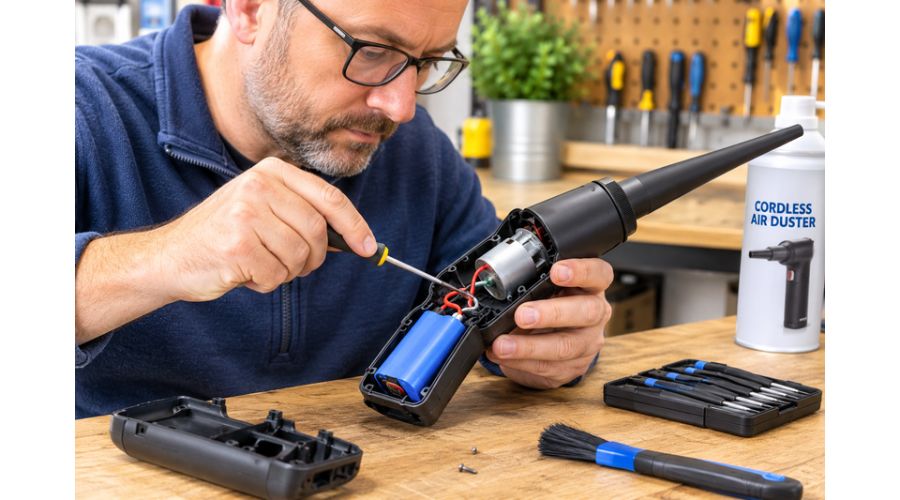
A cordless air duster makes it easier to remove Dust and debris from computers, keyboards, car interiors, electronics, and other hard-to-reach areas.
However, like any battery-powered tool, it can develop problems that affect its performance. You may press the power button and find nothing happens, notice the motor runs but produces weak airflow, or discover the device keeps shutting off during use.
If you are wondering why your cordless air duster isn’t working, the problem could involve the battery, charging system, motor, blocked air intake, or another faulty component.
The good news is that not every cordless air duster problem requires professional repair or replacement. You can fix some issues by checking the battery, cleaning the air intake, inspecting the nozzle, or correcting how you charge the device.
Read on as we explore these remedies.
Also Read:
Why Is My Cordless Air Duster Not Working? Common Causes and Fixes
A cordless air duster uses an electric motor, an internal fan, and a rechargeable battery to produce a stream of air. If any of these components fail, the device may not start or deliver the airflow you need.
Before replacing your air duster, check the most common causes. Some problems are simple, such as a discharged battery or blocked air intake, while others may involve a damaged motor or internal electrical component.
Dead or Discharged Battery
A discharged battery is one of the most common reasons a cordless air duster will not turn on. Unlike corded electric dusters, which draw power directly from an electrical outlet, cordless models rely on a rechargeable battery to run the motor.
When the battery runs out of power, the motor may fail to start even when you press the power button. Some models may display a low-battery indicator, flash an LED light, or produce a brief sound before shutting down. Other devices may show no response.
Battery-operated air dusters can also lose power quickly when used at their highest speed settings. High-performance models often require more energy to maintain strong airflow, so continuous operation at maximum speed can drain the battery faster than expected.
Solution
- Connect the air duster to its recommended charger.
- Charge the battery for the time specified in the manufacturer’s instructions.
- Check whether the charging indicator shows it is receiving power.
- Disconnect the charger and test the device again.
- If your model has a removable battery, make sure it is properly installed and seated.
Avoid repeatedly pressing the power button while the battery is completely discharged. If the device still doesn’t turn on after a proper charging cycle, check the charging cable, adapter, battery, and power connection.
Cordless Air Duster Is Not Charging
Sometimes the problem isn’t the battery itself, but the charging system. If your cordless air duster won’t charge, it may eventually stop working because the battery cannot receive enough power to run the motor.
Several components can contribute to this problem. The charging cable may be damaged, the adapter may be faulty, or the charging port may have accumulated Dust or become loose. You may also be using a charger that is incompatible with the device.
Some cordless air dusters use USB-C charging, while others require a dedicated charging adapter. Even when two devices have similar charging ports, their recommended power requirements may differ.
A damaged charging port can also prevent the battery from receiving power. If the connector feels loose or charging stops when you move the cable, you may need to have the port inspected.
Solution
- Inspect the charging cable for cuts, exposed wires, or damaged connectors.
- Check the manufacturer’s recommended charging specifications.
- Try a compatible charger and cable that meet those specifications.
- Examine the charging port for visible dirt or debris.
- Disconnect the charger before gently cleaning the port’s exterior.
- Check whether the charging indicator activates when you reconnect the device.
Do not force a connector into the charging port or insert metal objects to remove debris. If the port is loose, burnt, or physically damaged, stop charging the device and seek professional assistance.
The Air Intake Is Blocked
A cordless air duster needs an unobstructed air intake to draw air into its internal fan system. If the intake becomes blocked, the device may struggle to produce sufficient airflow.
Dust, lint, pet hair, and other small particles can accumulate around the intake grille, especially if you frequently use the device in workshops, garages, or dusty environments.
When airflow is restricted, the motor may work harder than normal while producing less air at the nozzle. You may notice weak airflow, unusual sounds, or overheating during extended use.
Some users mistakenly assume the motor has become weak when the real issue is a dirty intake.
Solution
- Turn off the air duster and disconnect it from the charger.
- Allow the device to cool completely if it has been running.
- Inspect the air intake grille for visible Dust and debris.
- Remove loose dirt using a soft brush or dry microfiber cloth.
- Follow the manufacturer’s cleaning instructions if the grille is removable.
- Check that no material remains trapped around the intake.
Do not push sharp objects into the air intake because they may damage the internal fan or electrical components. Also, avoid washing the device unless the manufacturer specifically states that the relevant parts are water-resistant and safe to clean that way.
The Air Duster Nozzle Is Blocked
Another possible reason your cordless air duster is not blowing air is a blocked nozzle. Most electric air dusters come with several attachments designed to direct airflow toward different surfaces.
These accessories are useful when cleaning keyboards, computer components, narrow gaps, and other difficult areas. However, Dust and debris can get trapped inside a nozzle, especially if you store it without cleaning it.
A blocked nozzle restricts airflow from the device. Depending on the severity of the blockage, the motor may sound normal while very little air comes out.
You may also notice that one attachment produces weak airflow while another works properly. This can indicate the problem is with the accessory, not the motor.
Solution
- Switch off the air duster.
- Remove the nozzle attachment.
- Inspect its opening for Dust, lint, or foreign objects.
- Clean the attachment using a soft brush or another manufacturer-approved method.
- Check the main unit’s air outlet for visible obstructions.
- Reinstall the nozzle securely and test the device.
Never insert your fingers or sharp tools into the nozzle while the device is connected to power. If you can’t remove an obstruction safely, replace the attachment or contact the manufacturer.
The Motor Is Overheating
An overheating motor can cause a cordless air duster to slow down, shut off unexpectedly, or refuse to restart until it has cooled.
Electric air dusters generate heat while operating, especially at high speeds. Continuous operation can increase the temperature of the motor and internal electronic components.
Some models include thermal protection that automatically shuts down the device when it becomes too hot. This feature helps prevent damage to the motor and other components.
Overheating may also occur if the air intake is blocked, the fan is obstructed, or you operate the device beyond its recommended duty cycle.
Solution
- Switch off the air duster immediately if it becomes unusually hot.
- Disconnect it from the charger if it is charging.
- Allow it to cool naturally in a well-ventilated area.
- Inspect the intake and outlet for obstructions.
- Check the manufacturer’s recommended operating time and cooling intervals.
- Avoid running the device continuously at maximum speed beyond its rated limits.
Do not place a hot air duster in water or a refrigerator to cool it quickly. Sudden temperature changes and moisture can damage its internal components.
If the device repeatedly overheats during short periods of normal use, stop using it and arrange an inspection.
The Motor or Internal Fan Is Damaged
The motor and fan are the main components that produce airflow. When either component becomes damaged, your cordless air duster may stop working properly.
A faulty motor may fail to start, make unusual noises, or run inconsistently. A damaged fan may produce weak airflow, excessive vibration, or an unusual rattling sound.
Damage can occur if the device is dropped, exposed to excessive moisture, or used with an obstructed air intake. Foreign objects entering the fan housing can also damage the blades or interfere with their movement.
If the fan becomes loose or its blades are damaged, the motor may continue running without producing the expected airflow.
Solution
Switch off the device and disconnect it from its charger. Inspect the exterior for cracks or signs of impact damage. Listen for unusual noises when testing the device again, provided there are no signs of electrical or battery damage.
Do not dismantle the motor housing unless the manufacturer specifically provides a safe repair procedure. Internal fans and electrical components can be delicate, and improper repairs may worsen the problem.
If the motor does not run, vibrates excessively, or smells like it’s burning, stop using the air duster. Contact the manufacturer or a qualified repair technician.
The Battery Is Worn Out or No Longer Holding a Charge
A cordless air duster may work normally at first but gradually develop shorter operating times. If you notice that the battery drains unusually quickly, it may have lost some of its original capacity.
Rechargeable batteries gradually wear out through repeated charging and discharging. Prolonged exposure to excessive heat, unsuitable charging equipment, and improper storage can also affect performance.
When battery capacity decreases, the air duster may run for only a few minutes before shutting down. It may also lose power more quickly when you select higher speed settings.
In some cases, the device may appear fully charged but stop working shortly after you switch it on.
Solution
- Charge the battery using the recommended charger.
- Check whether the operating time has decreased compared with when the device was new.
- Avoid exposing the air duster to excessive heat.
- Follow the manufacturer’s battery storage and charging recommendations.
- Replace the battery only if your model supports battery replacement and the manufacturer provides an approved replacement.
If the battery becomes swollen, leaks, emits an unusual smell, or becomes excessively hot, stop using and charging the device. Do not puncture, crush, or attempt to repair a damaged lithium-ion battery.
Power Button Is Faulty
Sometimes the battery and motor are functioning properly, but the air duster does not respond because the power button is damaged.
The power button controls the electrical connection that allows the device to start. If the internal contacts wear out or the button is physically damaged, the air duster may fail to turn on.
You may notice that the device starts only when you press the button several times or hold it at a particular angle. Other models may stop responding completely.
Dust and debris around the button can also interfere with its movement, although not every power-button problem is caused by dirt.
Solution
Inspect the power button for visible damage or obstruction. Make sure you follow the correct startup procedure, as some cordless air dusters require a long press, double press, or a separate speed-selection action.
If the button feels stuck, do not force it. Gently clean the surrounding exterior with a dry cloth, following the manufacturer’s instructions.
If the switch remains unresponsive despite having a charged battery, the internal switch or circuit may need professional repair.
Air Duster Is in the Wrong Operating Mode
Some cordless air dusters have multiple speed settings or operating modes. Depending on the model, you may need to press the power button once to activate the device and again to increase the speed.
Other products may include a safety lock or a startup sequence designed to prevent accidental operation.
If you are unfamiliar with the controls, you may assume the device is faulty when it is actually in standby mode, locked, or running at a low setting.
A low-speed setting may also produce less airflow than you expect, especially if you are comparing it with a more powerful model.
Solution
Read the operating instructions for your specific air duster. Check how the power button, speed controls, and safety lock work.
Make sure the device is fully activated before testing the airflow. If it has several speed settings, move through them as instructed and observe whether the airflow changes.
Avoid repeatedly pressing unfamiliar buttons or forcing the controls. If the device doesn’t respond as described in the manual, check the battery and electrical system.
A Loose Internal Connection Is Interrupting Power
A cordless air duster contains electrical connections between the battery, control circuit, and motor. If one of these connections becomes loose or damaged, the device may operate intermittently.
You may notice the motor starting and stopping unexpectedly, the display switching off, or the device losing power when you move it.
A loose connection can result from physical impact, manufacturing defects, wear, or internal component damage.
This problem can be difficult to identify because the air duster may look normal on the outside.
Solution
Check whether the battery is properly seated if your model has a removable battery. Inspect the exterior for signs of impact damage and confirm that the charging connector is secure.
If the device only works when tilted or moved in a particular direction, stop using it and have a professional inspect it. Do not shake the device aggressively or open its housing to adjust internal wiring.
The Air Duster Has Been Exposed to Moisture
Most cordless air dusters are designed for dry cleaning applications. Water entering the motor housing, battery compartment, or electronic controls can damage internal components.
Moisture may cause corrosion, electrical faults, or short circuits. Even if the device continues working at first, problems may develop later.
This can happen if you store an air duster in a damp environment, expose it to rain, or accidentally splash it during cleaning.
How to fix it:
If your air duster becomes wet, switch it off immediately. Disconnect the charger if it is connected, provided you can do so safely.
Do not attempt to switch it on to see whether it still works. Do not charge a wet device or use a hair dryer to force heat into its housing.
Follow the manufacturer’s instructions for moisture exposure. If water may have entered the motor or battery compartment, arrange a professional inspection before using or charging the device again.
The Charging Port or Battery Contacts Are Dirty
Dust can accumulate around the charging port and battery contacts, especially if you use your air duster in workshops, garages, or other dusty environments.
When dirt interferes with an electrical connection, the device may charge intermittently or fail to receive power.
You may notice the charging light flickering, the battery taking longer to charge, or the device working only when the connector is positioned a certain way.
Solution
Disconnect the device from the charger and inspect the external charging port. Look for Dust, lint, or visible damage.
Clean only the accessible exterior using a dry, soft cloth or another method approved by the manufacturer. Do not insert metal objects, apply liquid cleaners, or scrape the charging contacts.
If the connection remains unreliable, the charging port or battery contacts may require professional repair.
How to Fix a Cordless Air Duster That Won’t Turn On
If your cordless air duster doesn’t respond when you press the power button, start with the simplest checks before assuming the motor has failed.
Follow these steps to identify the problem.
Step 1: Check the Battery Level
Make sure the battery has enough power to operate the device. Connect it to the recommended charger and check whether the charging indicator activates.
If the battery is completely discharged, charge it according to the manufacturer’s instructions before testing the air duster.
Step 2: Inspect the Charging Cable and Adapter
A damaged cable or incompatible adapter can prevent the battery from charging.
Look for damaged insulation, bent connectors, or a loose connection. Use a charger that meets the manufacturer’s specifications.
Do not continue using a charger that gets unusually hot, smells like burning plastic, or has damaged wiring.
Step 3: Check the Power Button
Some electric air dusters require you to hold the power button for a few seconds. Others use a short press or a separate safety-lock mechanism.
Check the manual to confirm the correct startup procedure.
Step 4: Inspect the Battery Connection
If the battery is removable, check that it is properly seated in its compartment. A battery that is not fully connected may prevent the device from starting.
Do not force the battery into position or attempt to modify its contacts.
Step 5: Look for Signs of Overheating
If the device stopped working during use, let it cool completely before testing again.
Repeated overheating may indicate a blocked intake, excessive operating time, or a damaged internal component.
Step 6: Check for Physical Damage
Inspect the housing, charging port, battery compartment, and power controls.
If you notice cracks, swelling, exposed wires, or signs of burning, do not attempt to operate or charge the device.
Step 7: Contact the Manufacturer
If the air duster still does not turn on after these checks, the problem may involve the motor, control circuit, battery, or internal wiring.
Contact the manufacturer or an authorized repair provider for assistance.
Why Is My Cordless Air Duster Blowing Weak Air?
A cordless air duster can turn on normally but still fail to produce strong airflow. This problem is often caused by restricted airflow, low battery power, or a motor or fan issue.
Here are the main things to investigate.
Low Battery Power
Some cordless air dusters reduce their performance as the battery level drops. You may notice that the motor sounds weaker or that airflow decreases during extended use.
Fully recharge the battery and test the device again. If airflow improves after charging, low battery power may have been the cause.
Blocked Air Intake
A dirty intake prevents the fan from drawing sufficient air into the device. Inspect the grille and remove visible Dust or debris using an approved cleaning method.
Blocked Nozzle
A narrow nozzle can get clogged with dirt and lint. Remove the attachment and check whether the airflow improves without it.
If the device works normally without the attachment, clean or replace the nozzle.
Incorrect Nozzle Attachment
Different nozzle attachments are designed for different cleaning tasks. A narrow nozzle concentrates airflow into a smaller area, while a wider attachment spreads it over a larger surface.
If you use the wrong attachment, the airflow may seem weaker or less effective for the task.
Try another compatible nozzle and compare the results.
Damaged Fan or Motor
A damaged fan may fail to move air efficiently. A worn motor may also struggle to maintain the required speed.
If the device continues producing weak airflow after charging and cleaning, arrange a professional inspection.
Why Does My Cordless Air Duster Keep Stopping?
An air duster that repeatedly starts and stops can be frustrating, particularly when you are cleaning a computer or working in a dusty area.
Several factors can cause this problem.
Overheating Protection
Many cordless air dusters include thermal protection. If the motor gets too hot, the device may shut down automatically.
Allow it to cool and check the recommended operating intervals.
Low Battery Voltage
When the battery charge becomes too low, the device may shut down to protect the battery and electrical system.
Fully recharge it and test the device again.
Loose Battery Connection
If your air duster has a removable battery, an improperly seated battery may interrupt power during operation.
Check that it is correctly installed.
Blocked Air Intake
Restricted airflow can cause the motor to work harder and generate more heat. Clean the intake grille and inspect the fan housing for visible obstructions.
Internal Electrical Fault
If the device stops unexpectedly even with a fully charged battery and clear airflow, it may have an internal wiring or control circuit issue.
Do not attempt to bypass safety features or modify the electrical system. Seek professional assistance.
How to Maintain a Cordless Air Duster to Prevent Problems
Regular maintenance helps keep your cordless air duster working efficiently and reduces the risk of premature component failure.
Although electric air dusters don’t require the same maintenance as some workshop tools, their batteries, motors, fans, and air passages still need attention.
Clean the Air Intake Regularly
The intake grille lets the device draw air into its internal fan. Dust and debris can build up around this area, especially if you use the duster often.
Inspect the grille after use and remove visible dirt with a soft brush or dry cloth. Avoid pushing debris deeper into the housing.
Keep the Nozzle Attachments Clean
Nozzle attachments can collect Dust, lint, and other particles. Remove them after use and check their openings for blockages.
Store the attachments in a clean place to prevent debris from entering them.
Follow the Recommended Charging Procedure
Use the charger specified by the manufacturer. Avoid incompatible adapters and damaged charging cables.
Follow the recommended charging and storage instructions, and don’t leave the battery connected indefinitely without checking the manufacturer’s guidance.
Avoid Continuous Operation Beyond the Rated Limits
Some air dusters are designed for short cleaning sessions, not continuous operation at maximum speed.
Check the manufacturer’s recommended duty cycle. Let the motor cool when needed, especially after using high-speed settings.
Store the Air Duster Properly
Store your device in a dry, clean, well-ventilated area.
Avoid leaving it in direct sunlight, inside a very hot vehicle, or in places where moisture can reach the battery and electronic components.
Inspect the Device for Physical Damage
Check the housing, nozzle connections, charging port, and power button occasionally.
Fix loose attachments and visible damage before the problem worsens. If you notice battery swelling or a burning smell, stop using the device.
Follow the Manufacturer’s Instructions
Different cordless air dusters have different battery systems, motor designs, and operating limits.
Read the manual to understand the correct charging procedure, cleaning requirements, compatible accessories, and maintenance recommendations.
How to Use a Cordless Air Duster Safely
Using an electric air duster correctly helps protect both the device and the surfaces you are cleaning.
Although cordless air dusters are convenient, their powerful airflow can move Dust, small particles, and loose components unexpectedly.
Follow these precautions:
- Turn off sensitive equipment before cleaning: Shut down computers, consoles, and other electronics before directing airflow into them.
- Hold the device at a suitable distance: Follow the manufacturer’s recommended distance for the surface you are cleaning.
- Use the appropriate nozzle: Select an attachment designed for the cleaning task rather than forcing a narrow nozzle into delicate areas.
- Keep the air intake unobstructed: Avoid covering the intake while operating the device.
- Prevent fans from spinning excessively: When cleaning computer fans, hold the blades stationary using a suitable nonconductive method. Uncontrolled spinning can potentially damage the fan or generate unwanted electrical current.
- Avoid directing Dust toward yourself: Wear suitable eye protection when removing large amounts of Dust or debris.
- Keep the device away from moisture: Do not use it on wet electronics or in conditions where water may enter the housing.
- Follow the operating limits: Allow the device to cool if the manufacturer recommends breaks between cleaning sessions.
An electric air duster should not be treated as a substitute for every type of compressed-air tool. Always check whether it suits the material or equipment you intend to clean.
When Should You Replace Your Cordless Air Duster?
Most cordless air duster problems are worth troubleshooting before you purchase a replacement. However, some situations make repair impractical.
Consider replacing your air duster when:
The Battery No Longer Holds a Charge
If the battery has significantly deteriorated and the manufacturer doesn’t offer a suitable replacement, buying a new device may be more practical.
The Motor Is Permanently Damaged
A failed motor or damaged fan assembly may require expensive repairs. Compare the repair cost with the price of a replacement model.
The Charging System Is Beyond Repair
A damaged charging port or internal charging circuit may make the device unreliable or unsafe.
The Housing or Battery Is Damaged
Cracked housing, swollen batteries, and signs of electrical burning are serious problems. Stop using the device and follow the manufacturer’s advice on safe repair or replacement.
Replacement Parts Are Unavailable
Some inexpensive air dusters are not designed for extensive repairs. If the manufacturer cannot supply essential components, replacing the unit may be the better option.
Before purchasing another model, compare battery capacity, runtime, charging time, airflow, speed settings, nozzle attachments, and warranty coverage. Do not choose an air duster based on advertised RPM alone. Consider the overall design and whether it suits the cleaning tasks you perform most frequently.
Frequently Asked Questions
1. Why is my cordless air duster not turning on?
Your cordless air duster may not turn on because its battery is discharged, the charging system is faulty, or the power button is damaged.
Start by charging it with the recommended adapter and checking the charging indicator. If the device still doesn’t respond, check the battery connection and consult the manufacturer’s troubleshooting instructions.
2. Why is my electric air duster blowing weak air?
Weak airflow can result from a low battery, a blocked air intake, a clogged nozzle, or a damaged fan. Recharge the battery and inspect the intake grille and nozzle attachments.
If airflow remains weak after cleaning, the motor or internal fan may require professional inspection.
3. Why is my cordless air duster not charging?
The charging cable, adapter, charging port, or battery may be responsible. Check that you are using a compatible charger and inspect the cable for visible damage.
If the charging indicator does not activate, the charging port or internal charging circuit may need attention.
4. Why does my cordless air duster keep shutting off?
Your air duster may be overheating, running out of battery power, or experiencing an electrical interruption. Allow it to cool, recharge the battery, and check for blocked airflow.
If it continues shutting off during short cleaning sessions, contact the manufacturer.
5. How long should a cordless air duster battery last?
Battery runtime depends on battery capacity, motor power, speed setting, and operating conditions. High-speed operation generally uses more energy than low-speed operation.
Check the manufacturer’s stated runtime and remember that actual performance may vary depending on how you use the device.
6. Can I use a different charger for my cordless air duster?
Only use a replacement charger that meets the voltage, current, and charging requirements specified by the manufacturer.
A connector that physically fits may not necessarily provide the correct power. Using an unsuitable charger can damage the battery or charging circuit.
7. Can a blocked nozzle cause an air duster to overheat?
A blocked nozzle can restrict airflow and may increase operating temperature, depending on the design.
Remove the attachment, inspect it for debris, and clean it according to the manufacturer’s instructions. Do not operate the device if it shows signs of overheating or damage.
8. Can I replace the battery in a cordless air duster?
Some models have removable or manufacturer-replaceable batteries, while others have batteries integrated into the housing.
Check your product manual to determine whether replacement is supported. Do not attempt to dismantle a sealed lithium-ion battery pack.
9. Why does my cordless air duster make a strange noise?
Unusual noises may indicate a loose nozzle, a blocked fan, a damaged blade, a worn motor, or a foreign object in the airflow path.
Switch off the device and inspect the removable attachments and exterior. If the noise continues, stop using it and arrange an inspection.
10. Is it safe to use a cordless air duster while charging?
This depends on the manufacturer’s design and instructions. Some models may support operation while connected to a charger, while others prohibit it.
Check the manual rather than assuming that the device can safely operate and charge at the same time.
The video below shows how to repair an Opolar Cordless Air Duster
Conclusion
If your cordless air duster isn’t working, the problem may be a discharged battery, a faulty charging system, a blocked intake, a clogged nozzle, an overheating motor, or a damaged internal component.
Fortunately, you can resolve several of these issues through basic troubleshooting and proper maintenance.
Start by checking the battery and charger, inspecting the air intake and nozzle, and making sure the device has not overheated. If it still fails to turn on, produces weak airflow, or shuts down unexpectedly, seek professional assistance rather than attempting risky internal repairs.
Regular cleaning, correct charging, and proper storage can also help extend the life of your electric air duster. By identifying the problem early, you can restore reliable airflow and avoid replacing a device that may only need a simple fix.