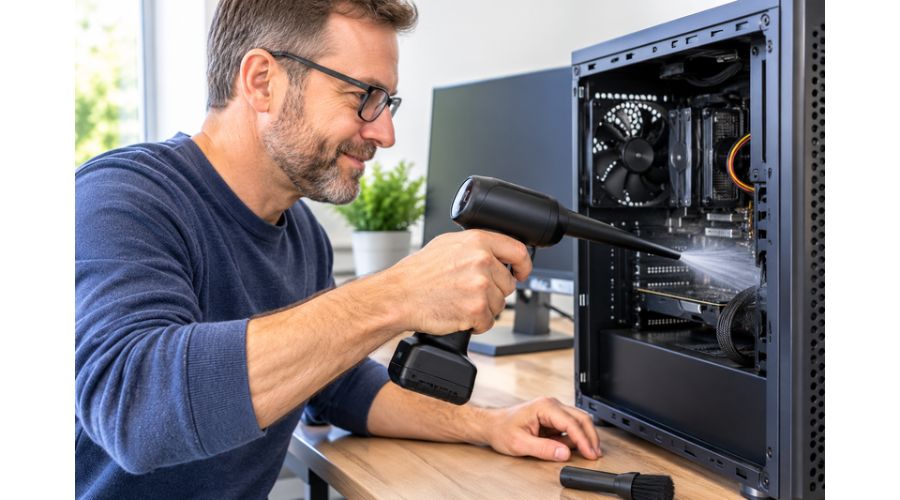
A cordless air duster is a convenient cleaning tool that helps you remove dust, dirt, and loose debris from places that are difficult to reach with an ordinary cloth.
Whether you want to clean a computer keyboard, remove dust from your desktop PC, clear debris from car air vents, or maintain household appliances, a rechargeable air duster can make the job easier.
Unlike traditional compressed-air cans, it uses a rechargeable battery and an electric motor to produce a continuous stream of air.
However, knowing how to use a cordless air duster correctly is just as important as choosing the right model. Powerful airflow can dislodge stubborn dust, but using the wrong nozzle, selecting an unsuitable speed, or directing air at delicate components can cause problems. You also need to understand how to prepare the equipment, control the airflow, and maintain the duster after use.
Read on as we illustrate how to correctly use a cordless air duster.
Also read:
How a Cordless Air Duster Works
Before using a cordless air duster, it helps to understand how the device produces airflow. This will make it easier to select the appropriate setting and use the tool correctly.
A cordless air duster uses an electric motor powered by a rechargeable battery. When you switch it on, the motor rotates an internal fan or impeller that draws air through an intake opening and forces it through the outlet nozzle.
The resulting airflow is directed toward the surface you want to clean. As the air moves across the surface, it loosens and pushes away dust, crumbs, hair, and other lightweight debris.
Unlike a compressed-air can, which releases stored propellant, an electric air duster generates airflow using its motor. This means you can use it repeatedly without purchasing disposable cans, provided the battery has sufficient charge and the device is maintained properly.
Most cordless air dusters have several features that influence how they operate.
Rechargeable Battery
The battery supplies the electrical energy needed to run the motor. Depending on the model, it may be built into the handle or housed in a removable battery pack.
Battery capacity, usually measured in milliamp-hours (mAh), influences how much energy the unit can store. However, capacity alone does not determine how long the duster will operate. Motor power, selected speed, battery condition, and operating conditions also affect runtime.
Electric Motor
The motor drives the internal fan or impeller that produces airflow. Some models have a single operating speed, while others offer several speed settings.
A more powerful motor may produce stronger airflow, but you should not automatically use the highest setting for every cleaning task.
Nozzle Attachments
The nozzle directs airflow toward the area you want to clean. Many cordless air dusters include narrow, wide, or brush-style attachments for different applications.
A narrow nozzle concentrates airflow in a smaller area, while a wider attachment spreads it over a larger surface. The correct choice depends on the size of the area and how delicate the material is.
Speed Controls
Some models have buttons or switches that allow you to select low, medium, and high airflow. Others use a trigger that controls the motor while you hold it.
Understanding these controls will help you avoid applying excessive airflow to delicate surfaces.
What You Need Before Using a Cordless Air Duster
You do not need many accessories to operate a cordless air duster. However, preparing the equipment and cleaning the area beforehand makes the process safer and more effective.
Here are the basic items you may need:
- A fully charged cordless air duster.
- The appropriate nozzle attachment.
- A microfiber cloth for wiping surrounding surfaces.
- A soft cleaning brush for stubborn or stuck-on dust.
- Safety glasses when cleaning heavily contaminated areas.
- A suitable dust mask when working in an area with significant airborne dust.
- The manufacturer’s user manual.
You should also identify the item you intend to clean and check whether its manufacturer permits the use of powered airflow.
For example, cleaning loose dust from a disconnected keyboard is different from directing strong airflow into an exposed laptop cooling system. Some computer manufacturers caution against using powered blowers on particular components. Always check the instructions for the exact device rather than assuming that every electronic product can be cleaned in the same way.
Prepare a dry, well-ventilated workspace. If you are cleaning a dusty computer, printer, or appliance, consider moving it to an area where expelled dust will not settle on other equipment.
3How to Use a Cordless Air Duster-Step by Step
Operating a cordless air duster is relatively straightforward. However, following the correct procedure helps you achieve better results while reducing the risk of damaging the tool or the item being cleaned.
Step 1: Check the Battery Level
Start by checking the battery level before switching on the air duster.
Most rechargeable models have indicator lights or a digital display that shows the remaining battery charge. Some display the battery percentage, while simpler models use illuminated bars.
If the battery is low, recharge it using the supplied charger or another charging accessory specifically approved by the manufacturer.
Avoid starting a major cleaning task when the battery is almost depleted. A low battery may reduce airflow or cause the motor to stop unexpectedly, depending on the model.
You should also inspect the charging cable, charging port, and battery housing for visible damage. Do not use a duster with a swollen battery, damaged charging connection, or signs of overheating.
Step 2: Select the Correct Nozzle Attachment
The next step is choosing the appropriate nozzle for your cleaning task.
Cordless air dusters often come with several attachments designed to direct airflow in different ways.
A narrow nozzle is useful for directing air into small gaps and hard-to-reach areas. A wider nozzle can cover larger surfaces, while brush attachments may help loosen dust from suitable surfaces.
Before attaching a nozzle, switch off the duster. Fit the attachment according to the manufacturer’s instructions and make sure it is securely connected.
Do not force an attachment into the outlet. If it does not fit easily, check whether you have selected the correct accessory.
A loose nozzle can detach when the motor starts, while an incorrectly fitted attachment may restrict airflow or affect performance.
Step 3: Prepare the Item You Want to Clean
Before turning on the duster, prepare the object you intend to clean.
If you are cleaning a computer, keyboard, printer, or other electronic device, switch it off and disconnect its power source where the manufacturer’s instructions require this. Disconnect removable accessories and allow recently used equipment to cool.
For a desktop PC, follow the computer and case manufacturers’ instructions before opening any panels. Do not open a power-supply unit or dismantle components that are not intended for user servicing.
For a wireless keyboard or mouse, switch it off and remove replaceable batteries if the manufacturer recommends doing so. For devices with built-in batteries, follow the manufacturer’s shutdown and cleaning instructions.
If you are cleaning a household item, remove loose objects and anything that could be blown away by the airflow.
Preparing the surface prevents debris from scattering unnecessarily and makes it easier to concentrate on the areas that need attention.
Step 4: Start With the Lowest Suitable Speed
Once the nozzle is fitted and the cleaning area is ready, switch on the cordless air duster.
If your model has adjustable airflow, begin with the lowest suitable setting. This allows you to assess how strongly the air moves before increasing the power.
A lower setting may be sufficient for removing loose dust from a keyboard, decorative items, or other delicate surfaces. You may need a stronger setting for suitable vents, filters, or larger surfaces, but always stay within the limits specified by the manufacturer.
Do not assume that maximum speed produces the best cleaning results. Excessive airflow can scatter debris, dislodge small parts, or damage delicate components.
Step 5: Hold the Duster at a Suitable Distance
Position the nozzle so that it directs air toward the dusty area without touching the surface.
The correct working distance depends on the duster, nozzle, airflow setting, and item being cleaned. There is no universal distance that is safe for every cordless air duster or electronic device.
Follow the manufacturer’s recommended distance. If the manual does not guide a particular application, avoid guessing or using strong airflow close to delicate components.
Keep the nozzle steady and direct the airflow toward an open area where loosened dust can escape.
Step 6: Use Short, Controlled Bursts
Move the nozzle across the dusty surface using short, controlled bursts of air.
Avoid holding the trigger continuously in one position for longer than the manufacturer’s instructions permit. Prolonged operation can cause the motor to heat up, and some models have specific duty-cycle limits.
Short bursts also give you better control over where the dust travels. Instead of pushing debris deeper into a gap, you can direct it toward an opening through which it can escape.
If dust remains attached to a surface, consider using a suitable soft brush to loosen it before applying another controlled burst. Do not scrape delicate components or use a metal tool around exposed electronics.
Step 7: Inspect the Surface After Cleaning
After removing the visible dust, switch off the air duster and inspect the cleaned area.
Check whether debris remains around corners, vents, gaps, or other difficult-to-reach sections. If necessary, reposition the nozzle and repeat the process using an appropriate setting.
Do not keep increasing airflow simply because a stubborn deposit refuses to move. Some dirt requires a brush or a different cleaning method rather than stronger air.
Once the job is complete, switch off the duster, allow the motor to stop, and remove the attachment if the manufacturer recommends doing so.
How to Use a Cordless Air Duster on Different Items
One of the main advantages of a cordless air duster is its versatility. You can use it for several cleaning tasks around your home, office, workshop, and vehicle.
However, the correct technique depends on the item being cleaned. The following examples explain how to approach common applications.
How to Clean a Computer Keyboard With a Cordless Air Duster
Keyboards collect dust, crumbs, hair, and other small particles between their keys. These materials can make the keyboard look dirty and may affect the feel of individual keys.
A cordless air duster can help remove loose debris from these spaces.
Start by switching off the computer and disconnecting the keyboard. If it is wireless, switch it off and follow the manufacturer’s instructions for removing replaceable batteries or disconnecting its power.
Turn the keyboard upside down and gently shake it to release loose particles. Do not hit it against a hard surface because this may damage the keys or internal components.
Select a suitable nozzle and begin with a low airflow setting. Hold the keyboard at an angle that allows debris to fall away from the keys rather than being pushed deeper into the switches.
Move the nozzle along the rows of keys using short bursts. Pay attention to the spaces around the larger keys, where dust and crumbs often accumulate.
Avoid forcing the nozzle between the keys or holding it directly against the keyboard. If the keyboard manufacturer allows keycap removal, you may remove the caps using the recommended tool before cleaning underneath them.
Once you finish, inspect the keyboard and wipe the outer surfaces with a suitable microfiber cloth.
How to Clean a Desktop PC With a Cordless Air Duster
Desktop computers can accumulate dust around cooling fans, air filters, heatsinks, and ventilation openings. Excessive dust buildup can restrict airflow and contribute to higher operating temperatures.
A cordless air duster may help remove loose dust, but you must follow the computer manufacturer’s cleaning instructions.
First, shut down the computer completely and disconnect the power cable from the wall outlet and the computer. Disconnect other cables and move the system to a suitable, well-ventilated workspace.
Open the case only if the manufacturer permits user access and explains how to do it. Never open the power-supply housing.
If the instructions permit cleaning the internal components with your particular air duster, use the approved nozzle and airflow setting. Keep the nozzle away from circuit boards and other sensitive parts.
When cleaning an accessible cooling fan, prevent the blades from spinning freely if the manufacturer’s instructions recommend doing so. Use a suitable nonconductive method that does not damage the blades.
Direct loosened dust out of the case rather than pushing it deeper into the computer. Clean removable filters separately using their recommended cleaning method, and allow washable filters to dry completely before reinstalling them.
Do not assume that advice for canned compressed air automatically applies to a powered air duster. These tools can have different airflow characteristics. Some computer manufacturers specifically warn against using blowers on their systems. If your computer’s documentation prohibits powered airflow, use the recommended alternative.
How to Clean a Laptop With a Cordless Air Duster
Laptops require more caution than desktop computers because their fans and internal components are smaller and more tightly arranged.
Start by shutting down the laptop and disconnecting the charger and external accessories. Allow the device to cool before cleaning its exterior vents.
Check the laptop manufacturer’s maintenance instructions to determine which areas you can safely clean yourself.
If the manufacturer permits airflow cleaning of the exterior vents, use only the method and airflow limits specified in its instructions. Avoid placing the nozzle directly against the vent.
Do not automatically direct powerful airflow into the laptop’s cooling system. Strong airflow at close range can damage small fan blades, and some manufacturers advise against using powered air devices for this purpose.
If dust is trapped deep inside the laptop, or the device is overheating and making unusual fan noises, professional servicing may be safer than attempting to clean the internal components yourself.
How to Clean a Gaming Console
Gaming consoles draw air through ventilation openings to cool their internal components. Over time, dust can accumulate around these openings and on accessible exterior surfaces.
Before cleaning, switch off the console, disconnect its power cable, and allow it to cool.
Check the console manufacturer’s instructions for approved cleaning methods. Use the cordless air duster only on areas where the manufacturer permits it.
Begin with an appropriate low setting and use short bursts to remove loose dust from accessible ventilation openings. Avoid inserting the nozzle deep into the vents or directing strong airflow toward internal fans.
Do not dismantle the console unless the manufacturer specifically permits it or you have the appropriate repair experience.
After cleaning, inspect the vents to ensure that loose debris has been removed without pushing dust further into the device.
How to Clean a Car Interior With a Cordless Air Duster
A cordless air duster is also useful for removing loose debris from certain areas of a vehicle.
Car interiors contain several narrow spaces where dust, crumbs, and other particles can accumulate. Examples include dashboard gaps, seat rails, cup holders, air vents, and areas around control buttons.
Begin by removing personal belongings and other loose items from the area you intend to clean.
Use a suitable nozzle to direct air into accessible gaps. Work carefully so that debris is pushed toward an area where you can collect it with a vacuum cleaner or cloth.
For dashboard vents, use controlled airflow rather than directing a powerful blast deep into the ventilation system. Be careful around electronic displays, switches, and delicate trim.
You can also use the duster to remove loose crumbs from suitable areas around seats and floor mats before vacuuming.
Avoid directing airflow toward people, animals or your face. If the interior is heavily contaminated with dust, use suitable respiratory protection and ventilate the vehicle.
How to Clean Camera Equipment
Camera bodies, lens barrels and certain external accessories can collect dust during regular use.
A cordless air duster may be suitable for removing loose debris from approved exterior surfaces, but you should be particularly careful around optical components.
Use the camera manufacturer’s cleaning instructions before applying powered airflow. Do not assume that a high-speed air duster is suitable for cleaning an exposed camera sensor or delicate lens coatings.
For external camera surfaces, use an approved low-airflow method and keep the nozzle from touching the equipment.
Avoid directing strong airflow into the lens mount, sensor chamber, or other sensitive openings unless the manufacturer specifically recommends that procedure.
For sensor cleaning, use the camera manufacturer’s approved method or a qualified camera technician.
How to Clean Household Appliances
Household appliances can accumulate dust around ventilation openings, filters, and exterior surfaces.
Examples include printers, fans, certain air-conditioning filters and other equipment with accessible areas that the manufacturer permits you to clean.
Before using an air duster, switch off and unplug the appliance where required. Allow hot equipment to cool, and check the manual for cleaning instructions.
Use a suitable nozzle to remove loose dust from approved exterior areas. For removable filters, follow the manufacturer’s cleaning procedure instead of forcing debris through the filter material.
Never direct airflow into an appliance that is wet, connected to power when it should be disconnected, or not designed for user cleaning.
For air conditioners, do not assume that the duster is suitable for every internal component. Electrical parts, delicate fins, and refrigerant-related components may require professional attention.
How to Choose the Correct Cordless Air Duster Speed
The speed setting determines how strongly the duster moves air, although the actual airflow depends on the model and nozzle being used.
Choosing the correct setting helps you remove dust without applying unnecessary force.
Low Speed
Low speed is generally the best starting point for delicate cleaning tasks.
It may be suitable for removing loose dust from external keyboard surfaces, decorative items, and other areas where excessive airflow could scatter small objects.
It also gives you more control when working around fragile accessories.
Medium Speed
Medium speed can be useful for general cleaning tasks where a little more airflow is needed.
Depending on the manufacturer’s instructions, it may be suitable for accessible vents, larger surfaces, and some household cleaning applications.
Always check that the item can withstand the airflow before increasing the setting.
High Speed
High speed produces the strongest airflow available on models with multiple settings.
It may be useful for suitable heavy-duty tasks, such as removing loose debris from robust outdoor equipment or approved workshop surfaces.
However, high speed is not appropriate for every application. Avoid using it close to delicate electronics, small components, fragile materials, or objects that could be dislodged.
The safest approach is to begin with the lowest suitable setting and increase the airflow only when the task requires it, and the manufacturer’s instructions permit it.
Common Mistakes to Avoid When Using a Cordless Air Duster
Although a cordless air duster is easy to operate, incorrect use can reduce its effectiveness or damage the item being cleaned.
Here are common mistakes to avoid.
Using Maximum Speed for Every Task
One of the most common mistakes is assuming that the highest speed will always produce better cleaning results.
Strong airflow can scatter dust, dislodge small objects, and damage delicate components. Start with a lower setting and increase it only when necessary.
Holding the Nozzle Too Close
Placing the nozzle directly against a surface can concentrate airflow in a small area. This may damage fragile materials or push debris further into openings.
Maintain the distance recommended by the manufacturer. Do not rely on a distance copied from instructions for another air duster.
Using the Wrong Nozzle
A narrow nozzle is not always the best choice. Although it concentrates airflow, it may be too aggressive for delicate surfaces.
Similarly, a wide nozzle may not provide enough precision for a small opening.
Choose the attachment based on the cleaning task and confirm that it is securely fitted.
Cleaning Electronics While They Are Powered On
Cleaning electronic equipment while it is operating can expose you to unnecessary risks.
Switch off and disconnect equipment as required by the manufacturer’s instructions. Do not clean a computer while it is running or connected to power if the cleaning procedure requires it to be unplugged.
Allowing Computer Fans to Spin Freely
When airflow is directed at a computer fan, the blades may rotate rapidly.
Uncontrolled spinning is not the objective of cleaning and may damage the fan or connected components. Follow the computer manufacturer’s instructions for preventing excessive fan movement.
Blocking the Air Intake
The air intake allows the duster to draw air into its motor and fan assembly.
Covering the intake with your hand, clothing, or another object can restrict airflow and cause the unit to operate improperly.
Keep the intake openings clear while using the device.
Running the Duster Continuously for Too Long
Some cordless air dusters are designed for intermittent use rather than continuous operation.
Prolonged use may cause the motor or battery to heat up. Follow the duty-cycle instructions in your manual and allow the device to cool when required.
Using It Around Liquids
A cordless air duster is not designed to blow liquids away from powered electrical equipment.
Keep the device away from wet surfaces and never direct airflow into equipment that has moisture inside it. Allow wet items to dry according to the manufacturer’s instructions before attempting to clean or operate them.
Ignoring the Manufacturer’s Instructions
Different models have different motors, batteries, attachments, and operating limits.
A technique that is suitable for one product may not be suitable for another. Read the user manual before your first use, particularly the sections covering charging, speed settings, nozzle attachments, and continuous operation.
Safety Precautions When Using a Cordless Air Duster
A cordless air duster is generally simple to use, but its airflow can move dust and small particles at high speed.
Following basic safety precautions helps protect you and the equipment being cleaned.
- Protect your eyes: Wear safety glasses when removing heavy dust or cleaning areas containing loose debris.
- Avoid breathing dust: Work in a well-ventilated area. Use appropriate respiratory protection when dealing with significant dust or potentially irritating particles.
- Keep airflow away from people and pets: Never point the nozzle toward someone’s face, eyes, or body.
- Keep fingers away from the intake and outlet: Do not place your fingers inside the openings while the motor is running.
- Avoid wet environments: Do not use or charge the device in wet conditions unless the manufacturer specifically rates it for that environment.
- Inspect the battery: Stop using the duster if you notice swelling, unusual heat, a burning smell, or visible battery damage.
- Keep children away: Store the duster and its attachments where children cannot access them.
- Use approved chargers: Charge the battery using the supplied charger or a compatible charging accessory approved by the manufacturer.
- Allow the motor to cool: Follow the recommended operating and rest periods.
- Avoid flammable materials: Do not direct airflow toward flammable dust, vapors, or materials that could be disturbed into a hazardous environment.
Remember that a cordless air duster is a cleaning tool, not a substitute for professional servicing. If an item requires internal repair or specialized cleaning, use the recommended service procedure.
How to Maintain a Cordless Air Duster After Use
Proper maintenance helps keep your cordless air duster working efficiently and may extend its useful life.
After each cleaning task, take a few minutes to inspect and care for the device.
Clean the Exterior Housing
Switch off the duster and disconnect it from its charger before cleaning the exterior.
Use a soft, dry cloth to wipe away dust and fingerprints. Avoid pouring water onto the device or immersing it in liquid.
If the manufacturer permits a slightly damp cloth, ensure that no moisture enters the intake, outlet, charging port, or battery compartment.
Inspect the Air Intake
The air intake allows the internal motor and fan assembly to draw in air.
Dust, hair, and other debris can accumulate around this opening and restrict airflow.
Inspect the intake regularly and remove visible debris using the cleaning method recommended by the manufacturer. Do not push dirt into the housing or insert sharp objects into the opening.
If your model has a removable filter, clean or replace it according to the instructions.
Clean the Nozzle Attachments
Remove the nozzle attachments after switching off the device.
Check them for accumulated dust, hair, or other obstructions. Clean them using the method recommended by the manufacturer.
Some attachments can be washed, while others should only be wiped clean. If you wash a removable nozzle, allow it to dry completely before attaching it again.
Charge the Battery Correctly
Battery care is important because the rechargeable battery supplies the power needed to operate the motor.
Use the correct charger and follow the manufacturer’s charging instructions. Avoid exposing the battery to excessive heat or moisture.
If you will not use the duster for an extended period, follow the recommended storage charge level and recharge schedule. Do not assume that every model should be stored fully charged or completely discharged.
Store the Duster Properly
Store the cordless air duster in a cool, dry place away from direct sunlight, excessive heat, and moisture.
Keep the attachments together in a storage pouch or suitable container so that they do not become lost or damaged.
Avoid placing heavy objects on the device, particularly around the nozzle, trigger, and battery housing.
How Often Should You Use a Cordless Air Duster?
There is no fixed cleaning schedule that applies to every household or piece of equipment. How often you should use a cordless air duster depends on the environment, the amount of dust produced, and the type of item being cleaned.
For example, a desktop computer in a dusty workshop may need more frequent inspection than a computer in a clean office.
A keyboard used every day may collect crumbs and dust more quickly than one used occasionally. Similarly, car interiors may need cleaning more frequently if you regularly transport passengers, pets, or equipment.
Instead of using the duster unnecessarily, inspect the item and clean it when visible dust or debris begins to accumulate.
For electronics, always follow the manufacturer’s maintenance schedule. Cleaning too aggressively or too frequently can create unnecessary wear or expose delicate components to avoidable risks.
Troubleshooting Common Cordless Air Duster Problems
Sometimes, your cordless air duster may fail to operate as expected. Understanding the possible causes can help you identify simple problems before seeking professional assistance.
Why Is My Cordless Air Duster Not Turning On?
A cordless air duster that does not turn on may have a discharged battery, faulty charging connection, damaged power button, or internal electrical problem.
Start by checking the battery level and charging the device using the approved charger. Inspect the charging port and cable for visible damage.
If the battery is charged but the device still does not respond, consult the manufacturer’s troubleshooting instructions. Do not dismantle the battery or motor housing unless the manufacturer provides an approved repair procedure.
Why Is My Cordless Air Duster Blowing Weak Air?
Weak airflow may result from a low battery, blocked air intake, obstructed nozzle, or worn internal components.
Check that the nozzle is fitted correctly and that the air intake is free from dust and debris.
Recharge the battery if necessary and test the duster using the recommended setting.
If the airflow remains weak after basic checks, the device may require servicing.
Why Does My Cordless Air Duster Keep Stopping?
A cordless air duster may stop unexpectedly because of battery protection, overheating, a loose battery connection, or an internal fault.
Allow the device to cool and check the battery level. If your model has a removable battery, inspect its connection according to the manual.
Do not continue operating a unit that becomes unusually hot, produces a burning smell, or shows signs of battery damage.
Why Is My Cordless Air Duster Making an Unusual Noise?
Unusual noises may indicate a loose nozzle, debris inside the air intake, a damaged fan, or another mechanical problem.
Switch off the duster and inspect the exterior openings and attachments.
If the noise continues after removing visible obstructions and refitting the nozzle, stop using the device and contact the manufacturer or a qualified repair technician.
For more troubleshooting advice, see our guide on Why Is My Cordless Air Duster Not Working?
Cordless Air Duster vs. Compressed Air Can: Which Is Easier to Use?
Both cordless air dusters and compressed-air cans are designed to remove dust from difficult-to-reach areas. However, they operate differently and have different advantages.
A cordless air duster uses a rechargeable battery and electric motor to generate airflow. You can recharge it and use it repeatedly without purchasing a new can each time.
A compressed-air can stores pressurized propellant and releases it through a nozzle when you press the actuator. It is ready to use without charging, but the contents are limited.
A cordless air duster may be more convenient for people who regularly clean keyboards, suitable computer equipment, car interiors, and household items. It also allows you to select different airflow settings on models that offer adjustable power.
Compressed-air cans may be more convenient for occasional tasks or situations where the manufacturer’s instructions specifically recommend canned air rather than a powered blower.
Neither option is automatically suitable for every electronic component. Always check the equipment manufacturer’s cleaning instructions and use the cleaning product according to its own manual.
Frequently Asked Questions
1. How do you turn on a cordless air duster?
Most cordless air dusters have a power button or trigger on the handle. Depending on the model, you may need to press and hold the button, press it once, or use a separate speed control.
Check the user manual for the correct operating procedure.
2. Can you use a cordless air duster to clean a computer?
You can use a cordless air duster on computer equipment only when the computer manufacturer and duster manufacturer permit the method.
Shut down and disconnect the equipment as instructed, use approved airflow settings, and take care around cooling fans. Some manufacturers specifically advise against powered blowers for certain components.
3. Can you use a cordless air duster on a laptop?
You may use an air duster on approved exterior surfaces if the laptop manufacturer permits it. However, avoid directing strong airflow into internal cooling fans without model-specific guidance.
Some manufacturers warn that powerful airflow can damage small laptop fan blades.
4. Do cordless air dusters need to be charged?
Yes. Rechargeable cordless air dusters use batteries to power their motors. The charging time depends on the battery capacity, charger, and model.
Use the supplied or manufacturer-approved charger and follow the recommended charging procedure.
5. Can you use a cordless air duster on a keyboard?
Yes, provided the keyboard manufacturer permits it and you use an appropriate airflow setting.
Switch off or disconnect the keyboard first, turn it at an angle to release debris, and use short bursts between the keys. Avoid forcing dust deeper into the switches.
6. Can a cordless air duster remove pet hair?
A cordless air duster can dislodge some loose pet hair from suitable hard surfaces, gaps, and vehicle interiors.
However, it may scatter the hair rather than collect it. Use a vacuum cleaner or lint-removal tool to collect the loosened hair afterward.
7. Is it safe to use a cordless air duster on a camera?
It depends on the camera and the area being cleaned. Some external surfaces may be suitable for careful dust removal, but exposed sensors, lens coatings, and delicate optical components require specialized cleaning methods.
Follow the camera manufacturer’s instructions.
8. How long can you run a cordless air duster continuously?
The maximum operating time depends on the model. Some cordless air dusters are designed for intermittent use and require cooling periods.
Check the manufacturer’s duty-cycle instructions instead of assuming that the device can run continuously until the battery is empty.
9. Can you wash cordless air duster attachments?
Some attachments are washable, while others should only be wiped clean. Remove them from the device and check the manufacturer’s instructions. Any washable attachment must be completely dry before being reattached.
10. How do you increase the battery life of a cordless air duster?
Use the recommended charger, avoid exposing the battery to extreme temperatures, and follow the manufacturer’s storage instructions. Avoid unnecessary high-speed operation because stronger settings may consume more power. Recharge and store the battery according to the product manual.
Conclusion
Knowing how to use a cordless air duster correctly helps you remove dust from hard-to-reach areas while protecting the equipment being cleaned. Start by checking the battery, selecting the right nozzle, and preparing the item. Use the lowest suitable airflow setting, maintain the manufacturer’s recommended working distance, and apply short, controlled bursts rather than directing continuous air at one spot.
Pay particular attention when cleaning electronics, especially laptops, computer fans, and camera equipment, because not every device is designed to withstand powered airflow. After use, clean the attachments, inspect the air intake, and store the duster in a cool, dry place.
With the right technique and regular maintenance, a cordless air duster can become a useful tool for keeping your electronics, vehicle, and household equipment free from loose dust and debris.