
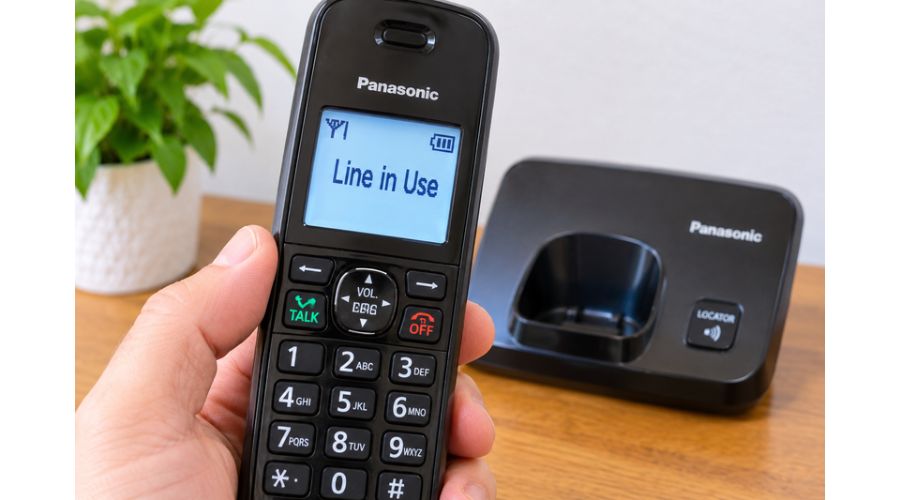
You pick up your cordless phone, press the TALK or PHONE button, and expect to hear a dial tone. Instead, the display shows “Line in Use,” even though nobody in your home or office is making a call. You try again, but the phone remains silent or produces a busy tone. This can be frustrating, especially when you need to make an important call.
A cordless phone that says line in use but has no dial tone may be detecting another device using the telephone line, experiencing a temporary line-voltage fluctuation, or having trouble communicating with its base station. Loose telephone cables, faulty wall jacks, problems with a VoIP adapter, and service interruptions can also cause the problem.
Fortunately, you do not always need to replace your phone.
We explain what the message means, why it appears, and how to fix a cordless phone that says line in use when nobody is using it. Our troubleshooting steps cover Panasonic, AT&T, VTech, and other popular cordless phone systems. Read On.
Also Read:
What Does Line in Use Mean on a Cordless Phone?
The Line in Use message indicates that the cordless phone system detects an active telephone line. Under normal circumstances, this happens when someone has picked up another handset connected to the same telephone line or when another telephone is making or receiving a call.
For example, if you have a Panasonic cordless phone with three registered handsets, one person may be talking on the second handset while the other two display Line in Use. This is normal because all the handsets share the same telephone line.
However, the situation is different when nobody is using the phone. If your cordless handset displays Line in Use continuously and you cannot hear a dial tone, the system may be detecting an incorrect line status.
This does not automatically mean the handset is damaged. The problem may originate from the telephone base, telephone cable, wall jack, another connected device, or the telephone service itself.
It is also important to distinguish between two situations:
- Line in Use with an active call: Another handset or telephone connected to the same line is using it. The message should disappear when the call ends.
- Line in Use with no active call: The phone may be detecting an abnormal line condition, another device may be holding the line open, or the service equipment may not be supplying the expected line signal.
Some cordless phone systems also display Line in Use when another telephone connected to the same line is off the hook. Therefore, checking every connected telephone is a sensible first step.
Why Does My Cordless Phone Say Line in Use?
Several problems can cause a cordless phone to display Line in Use when nobody is making a call. Identifying the likely cause helps you avoid unnecessary resets or replacing a perfectly functional handset.
I. Another Handset Is Still Using the Telephone Line
One of the simplest explanations is that another handset connected to the same base station is still using the telephone line.
This commonly happens in homes and offices with multiple cordless handsets. Someone may have answered a call on another handset and forgotten to end it. Also, a handset may have been left off its charger with the TALK button accidentally activated.
The phone system detects the active connection and displays Line in Use on the remaining handsets.
How to identify the problem:
- Check all handsets connected to the base station.
- Look for a handset displaying TALK, PHONE, or an active-call indicator.
- Check whether the base station’s IN USE light is illuminated.
- Press OFF or END on any handset that appears to be on a call.
- Wait a few seconds and check whether the Line in Use message disappears.
If the message clears after ending a call on another handset, your phone system is probably working normally.
II. A Connected Telephone Has Been Left Off the Hook
You may have a cordless phone connected alongside a traditional corded telephone, fax machine, or another telephone device.
If one of these devices remains off the hook, it can keep the telephone line occupied. Your cordless phone may therefore display Line in Use even when none of its handsets is being used.
The problem can be particularly confusing when the other device is in another room.
For instance, a corded telephone may have its handset resting incorrectly on the cradle. The telephone line then remains engaged, preventing your cordless phone from obtaining a dial tone.
How to fix it:
- Check every telephone connected to the same line.
- Make sure all corded telephone handsets are properly placed on their cradles.
- Disconnect fax machines, answering machines, and other telephone devices temporarily.
- Wait a few seconds before testing your cordless phone again.
- Reconnect the devices one at a time to identify whether one of them is holding the line.
If disconnecting another device restores the dial tone, inspect that device and its telephone connection.
III. A Temporary Telephone Line Voltage Fluctuation
Cordless phones monitor the electrical conditions on the telephone line to determine whether it is available or being used. If the line voltage changes unexpectedly, the phone may interpret the change as an active call.
This can produce a situation where the handset displays Line in Use even though nobody has picked up another telephone.
VTech specifically identifies temporary line-voltage fluctuations as one possible explanation for a Line in Use message when no other telephone is off the hook.
In some cases, the problem disappears on its own. However, repeated or persistent occurrences may indicate a problem with the telephone line or service equipment.
How to fix it:
- Disconnect unnecessary devices sharing the telephone line.
- Check that all telephone cables are firmly connected.
- Restart the cordless phone base station.
- Test the line using another working telephone.
- Contact your telephone service provider if the problem continues across multiple phones.
Do not assume the cordless phone is faulty simply because it reports an occupied line. The problem may be coming from the service connection.
IV. Loose or Damaged Telephone Line Cord
A loose or damaged telephone cable can interrupt communication between the cordless phone base and the telephone network.
The telephone line cord connects the base station to the wall telephone jack or an appropriate telephone port on a modem or VoIP adapter. If the cable is not properly connected, the phone may fail to receive a dial tone.
A damaged cable can also cause intermittent connections. Your phone may work occasionally before displaying Line in Use, No Line, or another connection-related message.
How to fix it:
- Locate the telephone line cord connected to the back of the base station.
- Disconnect it from the base and the wall jack.
- Inspect the cable for cuts, damaged plugs, bent contacts, or loose connections.
- Reconnect both ends securely.
- If possible, replace the cable with a known-working telephone line cord.
- Lift the handset and check for a dial tone.
Make sure you are using the telephone line port on the base station, not an unrelated connection such as an Ethernet port.
If replacing the cable solves the problem, the original cord was likely defective.
V. The Telephone Base Station Has Frozen
The cordless phone base station manages communication between the handsets and the telephone line. If its internal electronics become unresponsive, the phone may incorrectly report that the line is busy.
This can happen after a power interruption, an electrical disturbance, or a temporary software-related malfunction.
You may notice other unusual behavior, such as:
- The handset does not respond when you press TALK.
- The base station’s IN USE light remains on.
- Multiple handsets display the same message.
- The phone cannot make outgoing calls.
- The answering system stops responding normally.
Restarting the base station can clear temporary operating problems.
How to fix it:
- Disconnect the base station’s power adapter from the electrical outlet.
- Leave it unplugged for approximately 30 seconds.
- If your model has removable handset batteries, you can also remove them temporarily.
- Reconnect the base station’s power adapter.
- Allow the phone to restart and the handsets to reconnect.
- Check whether the Line in Use message has disappeared.
The exact reset procedure varies by manufacturer. Some models may require you to restore the date, time, or other settings after a reset.
VI. Problems With a VoIP Adapter or Modem
If your cordless phone connects through a modem, router, or Voice over Internet Protocol (VoIP) adapter, the problem may be with the equipment supplying your telephone service.
Unlike a traditional analog telephone line, VoIP service converts voice communication into digital data transmitted over an internet or provider network. The cordless phone base connects to an analog telephone port on the VoIP equipment.
A VoIP adapter may appear to be powered on and connected while still failing to provide a usable telephone signal. This can result in no dial tone, a busy tone, or a Line in Use message.
VTech documents this problem for some VoIP configurations and recommends checking the adapter and telephone connections.
How to fix it:
- Disconnect the telephone line cord from the TEL or PHONE port on the VoIP adapter.
- Unplug the VoIP adapter’s power supply.
- Disconnect other devices connected to the adapter if the manufacturer’s instructions recommend doing so.
- Wait briefly before reconnecting the power supply.
- Allow the adapter to finish starting up and establish its service connection.
- Connect the cordless phone base to the correct TEL or PHONE port.
- Test the phone again.
Check the connection carefully. The telephone base should connect to the VoIP adapter’s telephone output port. Do not connect the telephone wall outlet to the adapter’s TEL output port.
If the VoIP adapter still does not provide a dial tone, contact your internet or telephone service provider.
VII. A Faulty Telephone Wall Jack or Internal Wiring
Sometimes the cordless phone is perfectly functional, but the telephone wall jack or wiring is defective.
A damaged jack may fail to deliver the telephone signal to the base station. Loose wiring, corrosion, or problems with an internal telephone extension can also interrupt the connection.
This is more likely if several telephones connected to the same wall jack experience similar problems.
How to identify the problem:
- Connect the cordless phone base to another working telephone jack, if available.
- Test the original wall jack with a different telephone.
- Check whether other telephones connected to the same line have a dial tone.
- If the phone works on another jack, investigate the original jack and its wiring.
If multiple phones fail at the same location, contact your telephone service provider or a qualified technician to inspect the wiring.
VIII. A Telephone Service Interruption
Your telephone service provider may be experiencing an outage, account-related service restriction, or a fault affecting your telephone line.
When this happens, your cordless phone may display Line in Use, fail to produce a dial tone, or return a busy signal when you try to make a call.
The problem may affect all telephones connected to the same service.
How to fix it:
- Check whether other telephones connected to the line have a dial tone.
- Contact your telephone service provider to confirm that the service is active.
- Ask whether there is an outage or reported line fault.
- If you use VoIP, confirm that your internet and voice services are working.
- Request a line test if the provider cannot identify an outage.
If the problem is outside your home or within the provider’s equipment, resetting the cordless phone will not resolve it.
How to Fix a Cordless Phone That Says line in Use but Has No Dial Tone
Now that you understand the possible causes, follow these troubleshooting steps in order. Start with the simplest checks before moving to more advanced tests.
Step 1: Check All Connected Handsets
If your cordless phone system has multiple handsets, check whether another handset is currently using the line.
Pick up each handset and inspect its display. If one shows an active call or remains in TALK mode, press OFF or END to disconnect it.
Also check the base station for an illuminated IN USE indicator.
After ending any active call, wait a few seconds and try making a call again.
If the message disappears, there is no need to reset the entire telephone system.
Step 2: Check Other Telephones Connected to the Same Line
Disconnect or inspect other devices sharing the telephone line.
These may include:
- Corded telephones.
- Fax machines.
- External answering machines.
- Additional telephone bases.
- Other telephone equipment connected through extension sockets.
Make sure no corded telephone has been left off the hook.
For a more reliable test, disconnect the additional devices temporarily and leave only the cordless phone base connected.
If the cordless phone starts working, reconnect the devices one at a time to identify which one is causing the problem.
Step 3: Check the Telephone Cable Connections
A loose telephone cable can prevent the base station from receiving the line signal.
Follow these steps:
- Locate the telephone line cord at the back of the cordless phone base.
- Disconnect it from the base station.
- Disconnect the other end from the wall telephone jack or telephone adapter.
- Inspect both connectors and the cable.
- Reconnect the cable securely.
- Try making a call.
If you have a spare telephone line cord, use it to eliminate the possibility of a damaged cable.
Remember that the power adapter and telephone line cord perform different functions. The power adapter supplies electricity to the base station, while the telephone cable connects it to the telephone service.
Both must be connected correctly for most cordless phone systems to operate.
Step 4: Restart the Cordless Phone Base Station
A simple power reset can resolve temporary problems with the base station.
Use the following procedure:
- Disconnect the base station’s power adapter from the electrical outlet.
- Disconnect the telephone line cord from the base.
- Wait approximately 30 seconds.
- Reconnect the telephone line cord.
- Reconnect the power adapter.
- Wait for the base station and handsets to become ready.
- Press TALK or PHONE and check for a dial tone.
If the problem persists, consult your phone’s manual for its recommended reset procedure.
Avoid performing a factory reset immediately. A factory reset may erase stored contacts, settings, and handset registrations without fixing a telephone service problem.
Step 5: Test the Telephone Line With Another Phone
This is one of the most useful ways to determine whether the problem is with the cordless phone or the telephone service.
Disconnect the cordless phone base from the telephone wall jack and connect a known-working corded telephone to the same jack using a suitable cable.
Lift the receiver and listen for a dial tone.
What the results mean:
- The other telephone has a dial tone: The telephone line is probably working. Investigate the cordless phone, its base station, cable, or settings.
- The other telephone also has no dial tone: The problem may be with the wall jack, internal wiring, telephone service, or provider equipment.
- The other telephone works on a different jack: The original telephone jack or its wiring may be defective.
This test is particularly useful because it separates a telephone equipment problem from a service problem.
If you do not have a corded telephone, you can test your cordless phone at another location with a known-working compatible telephone connection.
Step 6: Check the Modem or VoIP Telephone Port
If you receive telephone service through a modem or VoIP adapter, inspect the equipment.
Check the following:
- Is the modem or VoIP adapter powered on?
- Is the telephone service indicator showing its normal status?
- Is the telephone base connected to the correct TEL or PHONE port?
- Is the telephone cable firmly connected at both ends?
- Is the internet or provider network connection working?
Restart the modem or VoIP adapter according to the provider’s instructions. Allow it to reconnect fully before testing the telephone.
Do not confuse the Ethernet or LAN port with the telephone port. The cordless phone base normally connects to the adapter’s dedicated telephone output.
If the adapter appears to be working but the phone still has no dial tone, ask your service provider to check the voice service and adapter configuration.
Step 7: Check Handset Registration and Base Communication
A cordless handset must be registered to its base station to communicate with the telephone system.
If the handset displays No Link, Searching, or another connection message, it may have lost communication with the base.
Move closer to the base station and check whether the handset reconnects.
If necessary, follow the registration instructions in your model’s manual.
Keep in mind that handset registration and telephone-line availability are different issues. A handset can communicate perfectly with its base and still fail to receive a dial tone because the telephone line or VoIP service is unavailable.
Do not deregister all handsets unless the manufacturer’s instructions specifically recommend it.
Step 8: Contact Your Telephone Service Provider
If you have checked the handsets, cables, base station, and telephone jack but still cannot get a dial tone, contact your service provider.
Explain that your cordless phone displays Line in Use even though no call is active.
Ask the provider to:
- Test the telephone line.
- Check for an outage or service interruption.
- Inspect the telephone connection and provider equipment.
- Verify the voice service configuration if you use VoIP.
- Confirm whether the telephone line is active and able to make outgoing calls.
If the provider confirms that the line is working correctly, the cordless phone base station may need further inspection or replacement.
The video below illustrates how to fix Vtech Cordless Phone that has no dial tone
How to Reset a Cordless Phone Base
Resetting the cordless phone base is worth trying when the system appears frozen, the Line in Use message remains on the display, or several handsets behave unusually.
However, there is a difference between restarting the phone and performing a factory reset.
A restart temporarily disconnects power to clear certain operating problems. A factory reset restores selected settings to their original state and may erase stored information.
How to Perform a Basic Power Reset
Follow these general steps:
- Disconnect the telephone base from its power outlet.
- Remove the telephone line cord from the base.
- If your model has removable batteries, remove them from the handsets.
- Wait approximately 30 seconds.
- Reconnect the telephone line cord.
- Reconnect the base station’s power adapter.
- Reinstall the handset batteries.
- Allow the handsets to reconnect to the base.
- Test the telephone line.
Some manufacturers recommend different waiting periods or reset sequences. Follow the instructions for your particular model when they differ from these general steps.
Should You Factory Reset Your Cordless Phone?
A factory reset should be a last resort, not the first troubleshooting step.
It may remove saved phonebook entries, caller ID settings, personalized configurations, and other information. Depending on the model, you may also need to register the handsets again.
More importantly, a factory reset cannot repair a damaged telephone cable, restore an interrupted service, or correct a faulty wall jack.
Before attempting one, confirm that the telephone line works with another phone. If the line is working but the cordless phone continues to malfunction, consult the manufacturer’s instructions for the appropriate reset procedure.
How to Check Whether the Problem Is With the Phone or Telephone Line
One of the biggest mistakes people make when troubleshooting a cordless phone is assuming the handset is defective.
A cordless phone can display Line in Use even when the actual problem is outside the phone system. The best way to avoid unnecessary repairs is to isolate the equipment and test the telephone connection independently.
Use the following comparison:
| Test | Result | What it suggests |
|---|---|---|
| Check all handsets | One is still on a call | Another handset is occupying the line |
| Disconnect other phones | Cordless phone works | Another device may be holding the line |
| Replace telephone cord | Dial tone returns | Original cable was faulty |
| Restart the base | Phone works normally | Temporary base malfunction |
| Test with another telephone | No dial tone on either phone | Possible line, jack, wiring, or provider fault |
| Try another working jack | Phone works | Original wall jack or wiring may be faulty |
| Test at another location | Phone works elsewhere | Original telephone connection may be the problem |
| Restart VoIP equipment | Dial tone returns | Temporary adapter or service equipment issue |
Test the Cordless Phone at Another Location
If possible, take the cordless phone base to another location with a known-working compatible telephone connection.
Connect the base using its correct power adapter and telephone cable, then test it.
If the phone works normally at the second location, the original telephone connection is a likely source of the problem.
If the same problem occurs at both locations, the cordless phone or its base station may be defective. However, confirm that the second location provides a compatible telephone service before reaching that conclusion.
When Should You Replace the Cordless Phone?
Consider replacing the phone only after you have ruled out the telephone line, cables, wall jack, and service equipment.
Replacement may be necessary if:
- The base station fails to provide a telephone connection on a known-working line.
- The phone repeatedly freezes after power resets.
- The telephone port on the base is physically damaged.
- The handset cannot communicate reliably with the base.
- The manufacturer confirms that the base station has a hardware fault.
If the phone is still under warranty, contact the manufacturer before purchasing a replacement.
Troubleshooting Panasonic, AT&T, VTech, and Other Cordless Phones
Although the basic troubleshooting process is similar across cordless phone brands, the display messages, reset procedures, and available settings can differ.
Here is what to check on some popular cordless phone systems.
Panasonic Cordless Phone Says Line in Use
Panasonic cordless phones display Line in Use when the telephone line is active. This can happen when another handset or telephone connected to the same line is being used.
Panasonic recommends checking the following:
- Confirm that the base station has power.
- Check whether another handset is using the telephone line.
- Check all telephone line connections.
- Confirm that other connected telephones are not occupying the line.
- Disconnect the base station’s power adapter for about five seconds, then reconnect it.
- Test the telephone line again.
If several Panasonic handsets display Line in Use and nobody is making a call, test the telephone line with another phone.
Panasonic also recommends testing the cordless phone on a different telephone line when a line-related problem persists.
One additional point is worth checking on older Panasonic models: some models have a configurable line mode. An incorrect setting can cause the Line in Use status to display improperly. However, this is model-specific and should not be changed unless the operating manual identifies it as a relevant setting.
AT&T Cordless Phone Has No Dial Tone
If your AT&T cordless phone displays Line in Use or fails to produce a dial tone, begin by checking the base station’s power supply and telephone cable.
AT&T’s troubleshooting guidance also recommends confirming that the handset battery is installed and charged correctly, checking the telephone jack, and ensuring that the handset is properly registered to the base.
Try these steps:
- Confirm that the base station is connected to a working electrical outlet.
- Check the telephone line cord at the base and wall jack.
- Try another telephone line cord.
- Move the handset closer to the base.
- Confirm that the handset is registered.
- Test another telephone on the same wall jack.
- Reset the telephone system if the handset is not responding normally.
For some AT&T systems, the manufacturer recommends disconnecting the base power and handset batteries, waiting a few minutes, and reconnecting them. Allow the handset to establish communication with the base before testing it.
Check your specific model’s manual before using this reset procedure.
VTech Cordless Phone Displays Line in Use
VTech explains that its cordless phones may display LINE IN USE when another handset or a telephone connected to the same line is active.
If nobody is using the line, temporary voltage fluctuations may cause the phone to detect an occupied line.
VTech also documents no-dial-tone problems involving VoIP equipment.
Try the following:
- Check whether another handset or telephone is off the hook.
- Disconnect other devices sharing the telephone line.
- Inspect the telephone cable.
- Restart the base station.
- Test the line with another telephone.
- If you use a VoIP adapter, check its power and telephone port connections.
If the VTech handset displays Line in Use with a busy tone despite nobody using the line, check the VoIP adapter and its telephone connections before assuming the handset is defective.
Other Cordless Phone Brands
The same basic checks apply to cordless phones from other manufacturers, including Motorola, Uniden, Gigaset, and similar brands.
However, button names and menu settings differ. Some systems use TALK, PHONE, or CALL to activate the line, while others have separate LINE buttons.
Always use the operating manual for your model when changing line settings, registering handsets, or performing a factory reset.
Frequently Asked Questions
Why does my cordless phone say Line in Use when nobody is using it?
Your cordless phone may be detecting an abnormal telephone line condition. Another connected telephone may be off the hook, the line voltage may be fluctuating, or the base station may have a temporary malfunction. Check all handsets, disconnect other telephones, inspect the cables, and restart the base station.
Why does my cordless phone have no dial tone but still show Line in Use?
The phone may be detecting the line as occupied even though it cannot establish a usable call connection. Possible causes include a faulty telephone line, damaged cable, incorrect VoIP connection, or a problem with the base station. Test the line using another telephone to identify where the fault originates.
How do I clear Line in Use on my Panasonic cordless phone?
First, check whether another handset or telephone is using the line. If nobody is making a call, inspect the telephone cable connections and confirm that the base station has power. Panasonic also recommends unplugging the base station for about five seconds before reconnecting it. Test the line again after the system restarts.
Why does my VTech phone say Line in Use with a busy tone?
A VTech phone may display Line in Use when another handset or telephone is using the same line. If nobody is making a call, a temporary line-voltage fluctuation or a problem with the VoIP adapter may be responsible. Check the connected devices, telephone cable, and VoIP equipment.
Can a bad telephone cord cause a Line in Use message?
Yes. A damaged or poorly connected telephone cord can interrupt the connection between the base station and telephone service. Replace the cord with a known-working compatible telephone cable and test the phone again.
Will resetting my cordless phone fix the problem?
A power reset can resolve temporary problems involving the base station or handset. However, it will not fix a damaged telephone line, faulty wall jack, or service outage. If the problem continues after restarting the phone, test the telephone line independently.
How do I know if my telephone line is faulty?
Connect a known-working corded telephone to the same telephone jack. If that phone also has no dial tone, the problem may involve the telephone jack, internal wiring, or service provider. If it works normally, investigate the cordless phone and its base station.
Can a router cause a cordless phone to display Line in Use?
Yes, if your telephone service is delivered through a VoIP adapter or a modem with a telephone port. The equipment may be powered on but unable to provide a usable telephone signal. Restart the equipment, check the TEL or PHONE port, and contact your service provider if the problem continues.
Does a weak cordless phone battery cause Line in Use?
A weak battery can cause a handset to behave unpredictably or fail to operate correctly. However, a battery problem is not the most common explanation for a Line in Use message. Charge the handset fully and check the base station and telephone connection before replacing the battery.
Conclusion
When a cordless phone says Line in Use but there is no dial tone, the problem may involve another connected telephone, a faulty cable, temporary line-voltage fluctuations, a frozen base station, or an issue with your telephone service. Fortunately, you can identify many of these problems without replacing the entire phone system.
Start by checking all connected handsets and telephones, then inspect the cables and restart the base station. If the problem continues, test the telephone line using another phone. This final step helps determine whether the fault is with your cordless phone or the telephone connection.
If you use VoIP, pay particular attention to the modem or adapter’s telephone port and service connection. Contact your provider if multiple phones fail to obtain a dial tone. Once you identify the source of the problem, you can apply the correct fix instead of spending money on unnecessary replacements.