
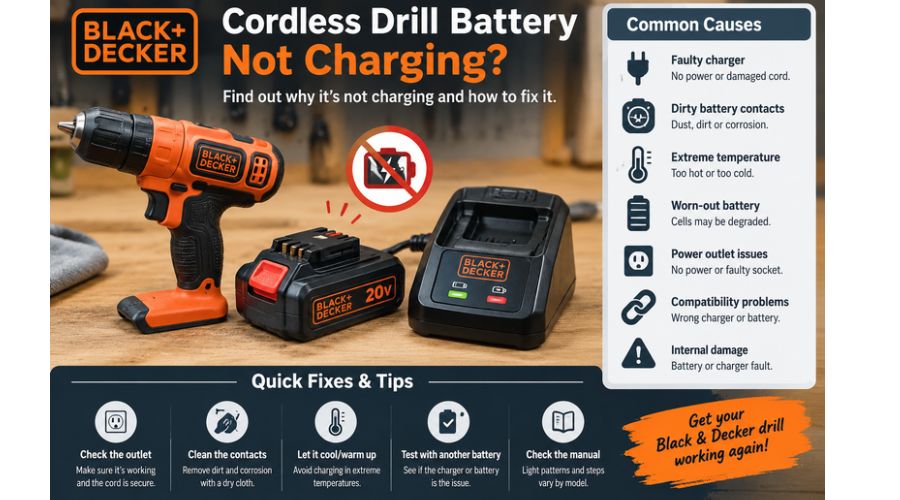
A cordless drill is a must-have tool in any DIYer’s toolbox. The Black and Decker cordless drill, for instance, is a popular preference for most DIY enthusiasts. The device offers undeniable convenience with user-friendly features, such as a lightweight, compact design and variable speed settings. However, like any equipment, the Black and Decker cordless drill may occasionally break down. As a result, it is not uncommon to experience issues like your Black and Decker cordless drill battery not charging, especially after prolonblack ged use. Before replacing your drill’s battery, try troubleshooting the issue.
The most likely reason your Black and Decker cordless drill battery isn’t charging is an unfavorable ambient temperature. First, check the battery’s temperature. If the battery is too hot or too cold, ensure you disconnect the drill from any power source. Then remove the battery and let it cool for a while; after that, reinstall ita nd your cordless drill should resume charging as usual.
Black and Decker Cordless Drill Not Charging: Causes and Solutions
A Black and Decker cordless drill battery may fail to charge because of problems with the power supply, charger, battery contacts, temperature, or internal battery cells. In some cases, the battery is simply too hot or cold to begin charging.
In others, the charger may be faulty, or the battery may have reached the end of its useful life. The best way to identify the cause is to check each possibility systematically.
Start with the simplest external issues before concluding that the battery needs replacing. Keep in mind that indicator lights and charging procedures can vary by battery model, voltage and charger type
Unfavorable Temperature
It is recommended to store your Black and Decker cordless drill at room temperature for optimal performance. Storing the battery in very high or low temperatures may prevent it from charging. Additionally, prolonged use of the cordless drill while plugged into a power source may cause the battery to overheat.
Check whether the battery feels too warm or cold to confirm whether this is the problem. Alternatively, check whether the charge light is flashing slowly, which indicates that the surrounding temperature is unsuitable for charging. If so, detach the battery from the drill and store it at room temperature to cool down. Once the temperature is restored, reinstate your battery and try charging the drill again.
Do not place the battery near a heater, in direct sunlight, or in a refrigerator to change its temperature quickly. Follow the temperature limits specified in your battery manual.
A Faulty Charger
A defective charger may be why your Black and Decker drill battery isn’t charging. The charger may have a damaged power cord, a faulty internal component, or a problem with the contacts that connect to the battery. If the charger’s indicator light doesn’t turn on, it may not be receiving power or may have developed a fault.
However, indicator lights vary by model, so check your charger’s manual before interpreting them. Test the power outlet with another working device, then inspect the charger for visible damage. If the outlet works but the charger still fails, test it with a compatible battery or have a qualified technician check it.
Dirty or Damaged Battery Contacts
Dust, dirt and oxidation on the battery terminals can interfere with the electrical connection between your Black and Decker battery and its charger. When this happens, the charger may fail to recognize the battery or deliver the power needed to charge it.
Remove the battery from the charger and inspect the metal contacts for dirt, corrosion, or visible damage. If the contacts are dirty, clean them gently with a dry, lint-free cloth. Make sure the battery and charger are disconnected from power before cleaning. Avoid using water or metal tools on the terminals.
If the terminals are corroded, you should see the charge indicator light flashing fast to indicate a poor connection between the drill’s battery and the charger. Therefore, wipe the battery’s contact terminals with a dry cloth before attempting to charge it again. If the flashing persists, replace the battery.
Empty or Faulty Battery
If you used the battery for a long time without recharging it, an empty battery is likely causing the problem. Over-discharging your Black and Decker cordless drill’s battery can also prevent it from charging. If the battery falls below four volts, recharging it may be difficult. In these cases, reviving the battery is the best solution, rather than replacing it, which can be costly.
The Battery Has Reached the End of Its Life
Rechargeable batteries gradually lose their ability to hold and accept a charge. If your Black and Decker drill battery is several years old, runs out of power quickly, or repeatedly fails to charge despite using a compatible, functioning charger, its cells may have deteriorated.
You might also notice that the battery powers the drill for only a short time before the tool stops working. Battery lifespan depends on usage, storage, charging habitsand battery type. Check whether the battery is still under warranty before buying a replacement.
If it is swollen, leaking, cracked, or unusually hot, stop using or charging it and arrange safe handling or recycling through an appropriate battery collection service.
The Power Outlet Is Not Working
Sometimes, the problem is not the battery or charger at all. A faulty wall outlet, switched-off power socket, tripped circuit breaker, or loose plug can prevent the charger from receiving electricity. First, check that the charger is firmly connected to the outlet and that any wall switch is turned on. Test the outlet with another suitable electrical device.
If the second device also fails, try a different working outlet, provided it matches your charger’s electrical requirements. Avoid using damaged extension cords or loose adapters.
If the charger works in another outlet, the original power supply was likely the problem. If the outlet appears damaged or sparks, stop using it and contact a qualified electrician.
The Battery Is Not Compatible With the Charger
Black and Decker offers batteries and chargers designed for different cordless tool systems, voltages, and battery types. A charger that fits physically may not necessarily be compatible with your specific battery.
Using the wrong charger can prevent charging or create a safety risk. Check the voltage, battery model number, and charger specifications against the manufacturer’s instructions. Confirm that the charger is designed for your battery chemistry and product range. Do not force the battery into the charger or use an adapter to bypass compatibility requirements.
If you recently purchased a replacement battery or charger, verify compatibility before testing further. Using the correct charging equipment is essential for safe and reliable operation.
The Battery Is Deeply Discharged
A battery stored empty for a long time may discharge below the level at which its protection circuit allows normal charging. When this happens, your Black and Decker charger may not recognize the battery or may show an unexpected indicator light. First, check the battery and charger manuals for instructions on handling a deeply discharged battery.
Connect the battery only to its designated, compatible charger and observe the normal charging procedure. If the charger still does not recognize it, the battery may require professional assessment or replacement. Do not attempt to jump-start the battery, connect it directly to another power source, or bypass its protection circuit, as these methods can cause overheating, fire, or injury.
The Battery or Charger Has Internal Damage
Internal damage can also explain why a Black and Decker cordless drill battery won’t charge. A battery may be damaged after a drop, exposure to moisture, or physical stress. Likewise, a charger may fail because of an internal electrical fault even when its exterior looks normal.
Signs such as a burning smell, melted plastic, leakage, swelling, or unusual heat should be treated seriously. Stop using the equipment and disconnect the charger from the power supply if you can do so safely.
Do not open the battery pack or charger to inspect internal components yourself. Have a qualified technician assess the faulty component, or replace it with an approved compatible product.
How To Revive a Cordless Drill Battery That Won’t Charge
All you need is a working spare Black and Decker battery and two good conductors, preferably paper clips. No worries if you don’t have a spare battery, since a car battery works too. With these items in place, follow the steps below to revive your cordless drill’s battery:
- Detach the battery that won’t charge from the cordless drill.
- Place the battery side by side with the functional one.
- Identify the positive and negative terminals of both batteries.
- Using a straightened paper clip, connect the positive terminal of the spare battery to that of your drill’s battery that won’t charge.
- Similarly, use another paper clip to connect the negative terminals of the two batteries.
- Wait for a few minutes for the battery to be jump-started, after which you can try charging the device again.
Since the drill’s battery was completely discharged, charge it for up to three hours to ensure it reaches a full charge. If this doesn’t resolve the issue, the battery may be faulty and may require a professional to fix it. Attempting to fix the battery by yourself could end up voiding the warranty. Therefore, the ultimate solution is to contact Black and Decker customer service.
How to Tell If a Black and Decker Battery or Charger Is Faulty
When your Black and Decker cordless drill battery is not charging, the first step is to determine whether the problem comes from the battery, charger, or power supply.
Start by plugging the charger into a working outlet and checking that the battery is correctly seated. Inspect the battery terminals and charger contacts for dirt, corrosion, or visible damage. Clean dirty contacts gently with a dry cloth after disconnecting the charger from power.
Next, check the charger’s indicator light and compare its behavior with the instructions for your specific model. If you have access to another compatible battery or charger, test the components separately. If another battery charges successfully, the original battery may be defective. If neither battery charges, the charger or power supply could be responsible.
Do not open the battery pack or attempt to measure or bypass its internal circuitry unless you are qualified to do so. If the cause remains unclear, have the battery and charger inspected by an authorized service provider before purchasing replacements
How To Care For Black and Decker Cordless Drill Battery
The Black and Decker cordless drill often costs an arm and a leg and having to replace it time and again could be a dealbreaker. That said, here are some of the recommended practices that extend the life of your Black and Decker cordless drill:
Charge the battery fully. This improves performance and helps prevent disruptions during your DIY projects.
Use the battery regularly. Even when idle, cordless drills can use up their batteries and completely deplete them. Therefore, recharge the battery occasionally when not in use to prevent it from being depleted.
Restore the battery to its carrying case after use to prevent exposure to dust or liquids.
- Store the drill’s battery in a cool, dry place to prevent corrosion of the contact terminals.
- Use proper torque settings to extend the battery run time. Using very high torque uses up the battery faster, reducing runtime.
- Avoid over-discharging the battery by ensuring the battery level does not go below four volts, as this often results in the battery not charging.
- Always have an extra or spare drill battery. This helps prevent interruptions caused by constant battery depletion in the middle of your projects.
What Do the Lights on a Black and Decker Battery Charger Mean?
The indicator lights on a Black and Decker battery charger can help you understand why your drill battery is not charging. However, their meanings vary between charger models, so always consult the manual for your specific battery and charger.
- Flashing green light: On many compatible models, this indicates that the battery is charging. Wait for the charger to signal that charging is complete.
- Steady green light: This may indicate that the battery is fully charged, although the exact meaning depends on the model.
- Flashing red light: On some chargers, this signals a battery fault. On others, a particular flashing pattern may indicate that the battery is too hot or too cold.
- No indicator light: Check the power outlet, charger connection, and battery seating. If the light remains off, the charger or battery may need inspection.
For example, BLACK+DECKER explains that certain chargers use rapid red flashing to indicate a weak or damaged battery, while alternating fast and slow red flashes can indicate a temperature problem. These signals are not universal across all models. If the indicator suggests a faulty battery, do not repeatedly attempt to charge it. Follow the manufacturer’s troubleshooting instructions or seek professional assistance.
When Should You Replace a Black and Decker Drill Battery?
You should consider replacing your Black and Decker drill battery when it repeatedly fails to charge, loses power unusually quickly, or no longer provides enough runtime for normal tasks. Before buying a replacement, check the power outlet, charger compatibility, battery contacts, and operating temperature. These simple checks can help rule out problems that do not require a new battery.
Another warning sign is a charger that repeatedly identifies the battery as defective according to the model-specific instructions. If you can safely test the battery using a known-compatible charger, that may help confirm the problem. However, a battery that is swollen, cracked, leaking, or unusually hot should be taken out of service immediately. Do not attempt to repair or recharge a visibly damaged battery.
When buying a replacement, match the battery to your drill’s model and voltage requirements, and confirm that it is compatible with your charger. Check the warranty before purchasing another battery, particularly if the drill or battery is relatively new. Dispose of the old battery through an approved battery recycling or collection service rather than placing it in household rubbish.
How to Maintain a Black and Decker Drill Battery
Proper maintenance can help extend the useful life of your Black and Decker cordless drill battery and reduce charging problems. Start by using the charger specified for your battery model. An incompatible charger may fail to charge the battery correctly or create a safety risk. Follow the manufacturer’s instructions for charging, and pay attention to the charger’s indicator lights.
Store the battery in a cool, dry place away from direct sunlight, heaters, and vehicles that can become extremely hot. Avoid exposing it to moisture or extreme cold. After demanding drilling tasks, allow a warm battery to cool naturally before charging if the manufacturer’s instructions require it. Slight warmth during normal charging can be expected, but excessive heat, swelling, or leakage requires you to stop using the battery.
Keep the battery contacts clean by gently wiping away dust with a dry cloth when the battery is removed from the charger and tool. Avoid dropping the battery or placing heavy objects on it. If you will store the drill for an extended period, follow the storage-charge recommendations in the manual rather than leaving the battery completely discharged. These habits can help preserve battery performance and reduce avoidable charging issues.
Frequently Asked Questions
How long does a Black and Decker cordless drill battery last?
Black and Decker cordless drill batteries are designed to retain charge when not in use. As a result, the batteries can last up to three years. Additionally, the batteries offer about one hour of run time. However, battery run time may decrease over time.
How do you change the battery in the Black and Decker cordless drill?
To change the battery in your Black and Decker cordless drill, identify the button located at the front of the installed battery, press it until the battery pops off, then remove the battery by gently sliding it off.
Then slide the replacement battery into the driver, ensuring the button is at the front. Press it as you slide the battery in until you hear a clicking sound and you’re good to go.
How long should you charge for a Black and Decker 18V battery?
Black and Decker 18V batteries take about three to six hours to fully charge. However, it is advisable to initially charge the device for six hours to enhance optimal performance. Consequently, to avoid overcharging the battery, you can check whether the charge light indicates that the device has been fully charged.
Black and Decker Battery Charger Light Not Coming On
If your Black and Decker battery charger light is not coming on, first check whether the charger is receiving power. Make sure the power cord is firmly connected and test the wall outlet with another device.
If the outlet works, inspect the charger’s cord, plug and housing for visible damage. Disconnect the charger before inspecting its contacts and check that the battery is correctly seated. Some chargers only illuminate their indicator lights under specific conditions, so consult your model’s manual.
If the light remains off, test with a compatible battery if available. A faulty charger may need professional assessment or replacement.
Black and Decker Battery Charger Green Light but Battery Not Charging
A green light on your Black and Decker battery charger may indicate that charging is complete, but its meaning depends on the model. If the battery still loses power quickly or will not operate your drill, remove it and check the battery contacts for dirt or damage. Gently clean dirty contacts with a dry cloth, then reconnect the battery securely. Allow a recently used battery to cool to room temperature before charging again.
Check your charger’s manual to confirm what the green indicator means. If the battery still cannot hold power, it may have deteriorated. Test with compatible equipment or seek professional advice before replacing the battery or charger.
Black and Decker Battery Gets Hot While Charging
A Black and Decker battery may become slightly warm during charging, but excessive heat is a warning sign. If the battery becomes very hot, smells unusual, swells, leaks, or changes shape, stop charging immediately and disconnect the power if safe.
Do not handle a damaged battery unnecessarily or attempt to cool it rapidly with water or ice. If the battery is only mildly warm, allow it to cool naturally in a dry, well-ventilated place before checking the manufacturer’s charging instructions. Keep batteries away from direct sunlight and heat sources.
If overheating happens repeatedly, stop using the battery and charger and arrange professional assessment or safe replacement.
Black and Decker Drill Battery Won’t Hold a Charge
If your Black and Decker drill battery won’t hold a charge, its cells may have deteriorated through age, repeated use, or improper storage. First, fully charge the battery with its compatible charger and follow the manufacturer’s instructions. Then test the drill under normal working conditions.
If the battery loses power unusually quickly, check the tool for excessive load or other problems that may increase power consumption. Inspect the battery for cracks, swelling, leakage, or other damage. A battery that repeatedly fails to hold a charge may need replacement. Choose a compatible Black and Decker battery with the correct voltage and specification and recycle the old battery through an approved collection point.
Can You Revive a Dead Black and Decker Drill Battery?
Whether you can revive a dead Black and Decker drill battery depends on the cause of the failure. If the battery is simply too hot or cold, letting it return to the temperature recommended in the manual may restore normal charging. If the contacts are dirty, gently clean them with dry cloth.
However, a battery with damaged cells or a failed protection circuit may not be recoverable. Use only the correct charger and follow the manufacturer’s instructions. Never jump-start the battery, bypass its protection circuit, open the pack, or connect it directly to another power source. Replace a faulty battery and recycle it safely.
How Long Does a Black and Decker Drill Battery Take to Charge?
The charging time for a Black and Decker drill battery depends on its voltage, capacity, chemistry and charger model.
Smaller-capacity batteries may charge faster than larger ones, while older batteries or basic chargers may take longer. For the correct estimate, check the battery and charger labels or consult the manufacturer’s manual for your specific model. Place the battery securely in its compatible charger and observe the indicator lights to determine when charging is complete.
Avoid charging if every battery takes the same amount of time, or leave it connected beyond the manufacturer’s recommended period. If charging takes unusually long or never complete, inspect the equipment and seek advice.
Conclusion
The best solution for a Black and Decker cordless drill battery that won’t charge is to keep it at an ideal temperature. Being a DIYer is challenging enough as you must train yourself and do your own research. So, a defective cordless drill battery could be a major dealbreaker, especially since replacing it can cost a fortune.
Fortunately, Black and Decker cordless drills come with a two-year warranty that could come in handy in these situations. However, before you replace the drill or its battery, try the remedies mentioned above. If the problem persists, consider contacting Black and Decker customer service to avoid the warranty.