
Cordless power tools have transformed the way DIY enthusiasts, woodworkers, and professionals handle everyday projects. You can drill holes, drive screws, assemble furniture, and complete repairs without searching for a nearby power outlet or struggling with extension cords. This convenience makes cordless drills especially useful when working outdoors, in garages, or in areas with limited access to electricity.
However, cordless tools depend on rechargeable batteries, and those batteries eventually lose their ability to hold a charge. Understanding how long cordless drill batteries last can help you plan your projects, avoid unexpected interruptions, and determine when a replacement is necessary.
A battery’s lifespan depends on several factors, including its chemistry, quality, charging habits, operating conditions, and storage environment. Some batteries provide reliable service for years, while others may deteriorate sooner because of frequent heavy use or poor maintenance.
This guide explains how long cordless drill batteries typically last, how to recognize a failing battery, and how to extend its useful life. It also covers charging times, battery replacement, compatibility, and the features to consider when purchasing a cordless drill.
How Long Do Cordless Drill Batteries Last?
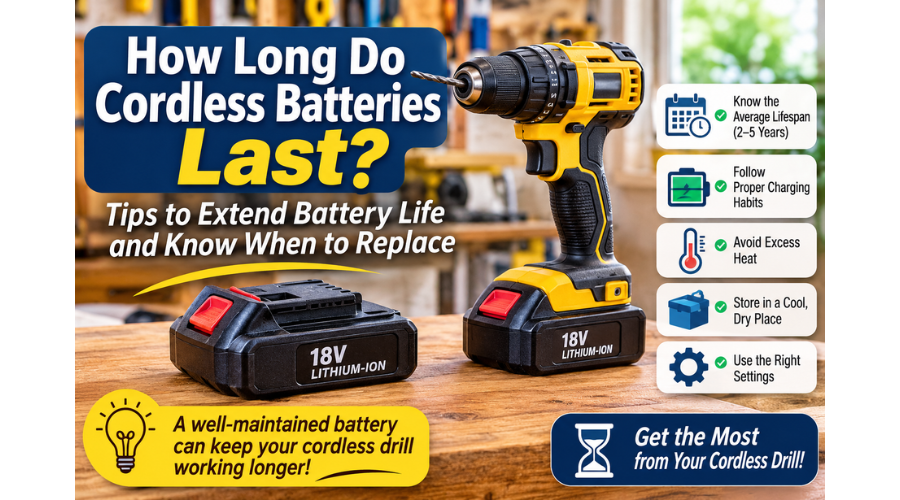
A cordless drill battery typically lasts around two to five years under normal use, although some batteries may last longer. The exact lifespan depends on the battery’s chemistry, the number of charge cycles it completes, and how well it is maintained.
Lithium-ion batteries are widely used in modern cordless drills because they offer a good balance of power, weight, and energy capacity. They gradually lose capacity as they age, even when they are not used regularly. However, proper charging and storage can help slow this process.
It is important to distinguish between two different meanings of battery life:
-
Runtime: How long a fully charged battery powers your drill before needing another charge.
-
Overall lifespan: How long the battery remains useful before its reduced capacity or performance makes replacement necessary.
For example, a cordless drill battery might power your tool for 30 minutes of intermittent drilling before requiring a recharge. After several years, the same battery may run for only 10 or 15 minutes under similar conditions.
The battery has not necessarily stopped working, but its reduced capacity may make it unsuitable for demanding projects.
How Long Does a Cordless Drill Battery Last Per Charge?
The runtime of a cordless drill battery depends on its capacity, the material you are drilling, the size of the drill bit, and the amount of pressure applied during operation.
A battery rated at 5.0 amp-hours (Ah) generally has more stored energy than a 2.0Ah battery of the same voltage. As a result, it can usually power the drill for longer under comparable conditions.
However, a larger battery does not automatically guarantee longer runtime in every situation. Drilling into hardwood, metal, or masonry requires more energy than driving small screws into softwood. Continuous operation also consumes power more quickly than occasional use.
If you are assembling furniture or completing small household repairs, a compact battery may provide enough runtime for the entire project. For prolonged drilling, construction work, or demanding applications, a higher-capacity battery can reduce the number of interruptions.
What Is the Average Cordless Drill Battery Lifespan?
The average cordless drill battery lifespan is often measured in charge cycles rather than years alone. A charge cycle represents the equivalent of using 100% of the battery’s capacity, although this does not have to happen in one session.
For example, using 50% of a battery’s capacity and recharging it, then using another 50% and recharging it, is approximately one full cycle.
Many lithium-ion power tool batteries are designed to withstand several hundred charge cycles before their capacity noticeably declines. The actual number varies by manufacturer, battery design, temperature, and operating conditions.
If you use your drill occasionally for household projects, the battery may remain useful for several years. A professional who uses the same drill throughout the working day may reach the battery’s cycle limit much sooner.
The best approach is to monitor battery performance rather than relying entirely on its age. A battery that still holds a useful charge and operates normally does not need to be replaced simply because it is several years old.
How to Extend Cordless Drill Battery Life
Proper cordless drill battery maintenance can help you get more value from your power tools. Although batteries naturally deteriorate over time, the way you charge, use, and store them can influence how quickly that deterioration occurs.
The following practices can help preserve battery capacity and reduce the likelihood of premature replacement.
1. Avoid Frequently Draining the Battery Completely
Modern lithium-ion batteries do not need to be completely discharged before recharging. In fact, repeatedly running them until the drill stops can contribute to unnecessary wear.
When you notice a significant reduction in power, consider recharging the battery rather than continuing to operate the drill until it shuts down.
You do not need to recharge the battery after every small task. However, avoiding repeated deep discharges is a sensible way to support long-term battery health.
Some cordless drills have electronic protection systems that shut down the tool when the battery reaches a low voltage. This helps prevent excessive discharge, but it is still better to recharge the battery before the protection system activates whenever practical.
2. Use the Correct Charger
Always use a charger approved by the drill manufacturer for your specific battery platform.
Different cordless drill batteries may have different voltages, charging requirements, and internal protection systems. A charger designed for one battery platform may not be suitable for another, even if the batteries look similar.
Using the correct charger helps ensure that the battery receives an appropriate charging current and that its internal protection system can operate as intended.
Avoid using damaged chargers, modified charging equipment, or chargers that are not approved for your battery. If the charger becomes unusually hot, produces an unusual smell, or shows signs of damage, stop using it and have it checked.
3. Recharge the Battery When Necessary
You do not need to wait until a battery is completely empty before recharging it. Lithium-ion batteries generally tolerate partial charging well.
If you are preparing for a project, charging the battery before use is a practical way to avoid interruptions.
For example, if you are installing shelves or assembling furniture, you can charge the battery while gathering your materials and preparing your workspace.
A partially charged battery can also be used when necessary. You do not have to wait for a full charge unless the task requires the maximum available runtime.
4. Avoid Excessive Heat During Charging and Use
Heat is one of the factors that can shorten a cordless drill battery’s lifespan.
Batteries may become warm during demanding drilling, continuous operation, or charging. Some warmth is normal, but excessive heat can accelerate chemical deterioration.
If your battery becomes unusually hot, allow it to cool before charging or using it again. Avoid leaving batteries in direct sunlight, inside a hot vehicle, or near other heat sources.
When charging, place the battery and charger in a dry, well-ventilated location. Do not cover the charger with clothing or other materials that could restrict airflow.
5. Store the Battery Properly After Use
Proper storage is essential when you are not using your cordless drill regularly.
Store batteries in a cool, dry location away from direct sunlight, moisture, and extreme temperatures. A suitable workshop cabinet or the manufacturer’s carrying case can help protect the battery from dust and physical damage.
For long-term storage, follow the manufacturer’s recommended charge level. Many lithium-ion battery manufacturers recommend storing batteries partially charged rather than completely full or completely empty.
If you will not use your drill for several months, check the battery periodically and recharge it if necessary. Avoid leaving it completely discharged for an extended period.
6. Use the Appropriate Drill Settings
The way you operate your cordless drill can affect battery runtime.
High torque, continuous drilling, and demanding materials require more energy than light-duty applications. Selecting the correct gear and clutch setting can help prevent unnecessary battery consumption.
For example, when driving screws into softwood, a lower torque setting may be sufficient. When drilling larger holes in hardwood, you may need a slower speed and greater torque.
Use the setting that matches the task rather than operating the drill at maximum power for every application.
7. Keep the Battery and Tool Clean
Dust, debris, and moisture can interfere with the connection between the battery and the drill.
After use, inspect the battery terminals and remove loose dust with a clean, dry cloth. Avoid using water or cleaning chemicals on the electrical contacts.
If you are working in a dusty environment, keep the battery in its case when it is not attached to the drill.
A clean connection helps the battery deliver power reliably and reduces the risk of connection problems that may be mistaken for battery failure.
Why Do Cordless Drill Batteries Lose Their Charge?
Even with proper maintenance, cordless drill batteries gradually lose their ability to store energy. This is a normal part of battery aging, but certain conditions can accelerate the process.
Understanding these factors can help you determine whether your battery is reaching the end of its useful life or whether a problem with its charging or operating conditions is responsible.
1. Natural Battery Aging
Rechargeable batteries contain chemical components that gradually deteriorate as they are used. Over time, these changes reduce the amount of energy the battery can store and deliver.
This process occurs even when the battery is not used frequently. Therefore, a cordless drill battery that has been sitting in storage for several years may have less capacity than a newer battery.
Although proper maintenance can slow battery degradation, it cannot prevent it entirely.
2. Frequent Heavy-Duty Use
Using a cordless drill for demanding tasks places greater strain on its battery.
Drilling large holes, driving long screws, and working with dense materials require more power than light household repairs. Frequent heavy-duty use can also generate additional heat, which may accelerate battery deterioration.
If you regularly use your drill for construction or woodworking, consider keeping a spare battery available. This allows you to continue working while the other battery charges or cools down.
3. Improper Charging Practices
Using an incompatible charger or charging a damaged battery can affect its performance and safety.
Although modern lithium-ion batteries have built-in protection systems, these systems cannot compensate for every charging problem.
Always follow the manufacturer’s charging instructions. Avoid leaving batteries in extreme temperatures while charging, and never attempt to charge a battery that is visibly damaged or swollen.
4. Poor Storage Conditions
Storing batteries in hot, humid, or freezing environments can shorten their useful life.
For example, leaving a cordless drill battery inside a vehicle during hot weather can expose it to temperatures that accelerate chemical deterioration.
Similarly, storing batteries in damp locations can increase the risk of corrosion or damage.
A cool, dry storage location is generally best, provided it remains within the temperature range recommended by the manufacturer.
How to Know When a Cordless Drill Battery Is Bad
A cordless drill battery does not always stop working suddenly. In many cases, its performance gradually declines until it becomes inconvenient or unsuitable for your projects.
Recognizing the warning signs can help you determine whether you need a replacement.
1. The Battery Runs Out Quickly
One of the most common signs of a failing cordless drill battery is reduced runtime.
If a fully charged battery previously powered your drill through an entire project but now requires frequent recharging, its capacity may have deteriorated.
However, short runtime does not always mean the battery is defective. A larger drill bit, harder material, or more demanding application can also increase power consumption.
Compare the battery’s performance under similar conditions before deciding that it needs replacement.
2. The Battery Takes Longer to Charge
A battery that takes noticeably longer to charge than it used to may be experiencing deterioration.
However, charging time also depends on the charger, battery temperature, and the amount of energy remaining when charging begins.
If the charger repeatedly indicates an error or the battery never reaches a full charge, inspect both components. A faulty charger can produce symptoms similar to those of a bad battery.
3. The Drill Loses Power Under Load
A worn battery may still operate the drill when there is little resistance but struggle when you begin drilling into harder materials.
For example, the drill may run normally in the air but slow down significantly when driving screws into hardwood.
This can happen because the battery is no longer able to deliver sufficient current under demanding conditions.
Before replacing it, make sure the drill bit is sharp, the tool is operating correctly, and the battery is fully charged.
4. The Battery Becomes Unusually Hot
Some warmth during charging or use is normal. However, excessive heat, swelling, leaking, or an unusual chemical smell can indicate a serious battery problem.
Stop using or charging a battery that shows these signs. Do not attempt to open, repair, or force it into the drill.
Follow the manufacturer’s instructions for safe handling and disposal.
5. The Battery No Longer Holds a Charge
A battery that loses most of its charge shortly after charging may have reached the end of its useful life.
Before replacing it, check whether the problem is caused by the charger, dirty contacts, or a faulty drill.
If the battery consistently fails to hold a charge despite using the correct charger, replacement is usually the most practical solution.
How Long Do Cordless Drill Batteries Take to Charge?
Cordless drill battery charging times vary according to battery capacity, charger output, battery chemistry, and temperature.
A small battery may take less than an hour to charge with a compatible rapid charger, while a larger battery may require several hours with a basic charger.
The following table provides general examples rather than guaranteed charging times.
| Battery capacity | Typical charging time |
|---|---|
| 1.5Ah | Around 30–60 minutes |
| 2.0Ah | Around 30–90 minutes |
| 4.0Ah | Around 60–120 minutes |
| 5.0Ah | Around 60–150 minutes |
These estimates assume a compatible charger and suitable charging conditions. Actual charging times vary by manufacturer and charger model.
Can You Leave a Cordless Drill Battery on the Charger?
Many modern cordless drill chargers are designed to stop or reduce charging when the battery reaches full capacity.
However, this does not mean every battery should remain on the charger indefinitely.
Follow the manufacturer’s instructions regarding charging and storage. If the charger is not designed for continuous connection, remove the battery once charging is complete.
Avoid charging batteries near flammable materials or in locations where excessive heat can accumulate.
Should You Charge a New Cordless Drill Battery Overnight?
You generally do not need to charge a modern lithium-ion cordless drill battery overnight.
Most manufacturers recommend charging the battery until the charger indicates that it is full. Once charging is complete, you can remove it and use the drill.
Some older battery technologies had different charging requirements, so it is important to check the instructions supplied with your particular tool.
Do not assume that every battery needs an extended initial charge.
Can You Repair a Cordless Drill Battery?
Whether a cordless drill battery can be repaired depends on the nature of the problem.
A battery that is simply discharged may work normally after charging with the correct charger. A battery with dirty contacts may also regain reliable operation after the contacts are cleaned appropriately.
However, a battery with damaged internal cells, a faulty protection circuit, swelling, or leakage should not be repaired casually.
Opening a lithium-ion battery pack can expose you to electrical and fire hazards. Unless you are qualified to work with battery systems, replacement is generally the safer option.
Is It Worth Replacing a Cordless Drill Battery?
Replacing a battery can be worthwhile if your drill is still in good condition and the replacement battery is reasonably priced.
For example, if you own a reliable cordless drill that meets your needs, purchasing a compatible replacement battery may be more economical than buying an entirely new tool.
However, if the drill is old, damaged, or incompatible with readily available batteries, replacing the complete tool may make more sense.
Before purchasing a replacement, check the battery’s voltage, model number, and compatibility with your drill.
Why You Should Consider Using a Cordless Drill
Cordless drills have become popular among homeowners, DIY enthusiasts, and professionals because they offer convenience and flexibility.
Although corded drills remain useful for certain applications, cordless models provide several advantages that make them suitable for a wide range of projects.
1. Convenience
One of the main advantages of a cordless drill is that it does not require a nearby power outlet.
You can use it in a garage, garden, workshop, or construction site without running an extension cord.
This makes it easier to move between work areas and complete tasks in locations where electricity is not readily available.
2. Portability
Cordless drills are generally easy to transport because they do not require a power cable.
Many models are compact enough to fit into a tool bag or carrying case, making them convenient for contractors and homeowners who frequently move between projects.
Their portability also makes them useful when working on ladders, inside cabinets, or in other restricted spaces.
3. Reduced Cable-Related Hazards
A cordless drill eliminates the need for an electrical extension cord during normal operation.
This reduces the risk of tripping over cables and makes it easier to work in areas where cords could become tangled or damaged.
However, cordless drills still require proper handling. Always secure the workpiece, use suitable protective equipment, and keep your hands away from rotating components.
4. Versatility
A cordless drill can perform several tasks when fitted with the appropriate accessories.
You can use it to drill holes, drive screws, assemble furniture, install shelves, and complete various repair jobs.
Some models also support hammer-drilling functions for suitable masonry applications.
For demanding concrete drilling, however, a dedicated rotary hammer may be more appropriate than a standard cordless drill.
5. Improved Mobility
The absence of a power cord allows you to move freely around your workspace.
This is particularly useful when working on large furniture, installing fixtures, or carrying out repairs in different rooms.
A spare battery can further improve productivity by allowing you to continue working while the other battery charges.
Features to Consider When Buying a Cordless Drill
Choosing the right cordless drill requires more than comparing prices or selecting the model with the highest voltage.
The best drill for your needs depends on the type of work you intend to perform, how frequently you will use it, and the materials you will be drilling.
1. Battery Voltage
Voltage provides an indication of a cordless drill’s electrical power potential.
Common cordless drill platforms include 12V and 18V or 20V-class tools. Lower-voltage drills are often suitable for household repairs, furniture assembly, and light drilling.
Higher-voltage models generally provide more power for demanding tasks, although performance also depends on the motor, gearing, and battery design.
Choose a voltage that matches your intended applications rather than automatically selecting the highest available rating.
2. Battery Capacity
Battery capacity, measured in amp-hours, indicates how much electrical charge the battery can store.
A 4.0Ah battery generally provides more runtime than a 2.0Ah battery of the same voltage under comparable conditions.
However, higher-capacity batteries are often heavier and may make the drill less comfortable to use for extended periods.
If portability is important, a smaller battery may be preferable. For prolonged drilling or construction work, a larger battery can reduce interruptions.
3. Torque
Torque is the twisting force a drill produces.
Higher torque is useful when driving large screws, drilling into dense materials, or working with larger drill bits.
Many cordless drills include adjustable clutch settings that help control the amount of torque applied when driving screws.
A drill with sufficient torque for your intended projects can make work easier and reduce the likelihood of damaging fasteners or materials.
4. Speed Settings
Cordless drills commonly feature variable-speed triggers and multiple mechanical gears.
Lower speeds provide greater control and are useful for driving screws or drilling larger holes.
Higher speeds are generally suitable for smaller drill bits and lighter drilling applications.
A two-speed gearbox allows you to select a suitable balance between speed and torque.
5. Handle Design and Comfort
A comfortable handle can make a significant difference when using a cordless drill for extended periods.
Look for a design that provides a secure grip and allows you to maintain control without excessive hand strain.
A well-balanced drill can also reduce fatigue, especially when working overhead or in confined spaces.
If possible, hold the drill before purchasing it to determine whether its weight and grip suit your needs.
6. Brushless Motor
Brushless cordless drills use electronic controls instead of traditional motor brushes.
They are often more efficient and may provide longer runtime, reduced maintenance, and improved durability compared with similar brushed models.
However, brushless drills are not automatically better for every user. A brushed drill may still be suitable for occasional household repairs, particularly when cost is a major consideration.
7. Battery Platform Compatibility
Battery compatibility is important when purchasing a cordless drill.
Many manufacturers offer battery platforms that allow compatible batteries to power several tools from the same product range.
If you already own cordless tools, choosing a drill that uses the same battery platform can reduce the cost of purchasing additional batteries and chargers.
Always confirm compatibility before buying a replacement battery or another cordless tool.
Types of Cordless Drills on the Market
Cordless drills are available in different designs to accommodate various applications.
Understanding the differences can help you choose a tool that provides the performance you need.
1. Standard Cordless Drill/Driver
A standard cordless drill/driver is suitable for drilling holes and driving screws.
It is commonly used for household repairs, furniture assembly, woodworking, and general construction.
Most models feature adjustable torque settings, variable speed, and a keyless chuck that allows you to change drill bits quickly.
2. Cordless Hammer Drill
A cordless hammer drill combines rotary drilling with a hammering action.
This makes it suitable for drilling into certain masonry materials, including brick and concrete, when used with the appropriate masonry bit.
Hammer drills are generally more versatile than standard drill/drivers, but they may be heavier and more expensive.
For frequent or heavy-duty concrete drilling, a rotary hammer is usually a better choice.
3. Rotary Hammer
A rotary hammer is designed for demanding masonry and concrete applications.
It uses a more powerful hammering mechanism than a conventional hammer drill, allowing it to drill larger holes and perform heavier work.
Some rotary hammers also support chiseling functions for removing concrete or masonry.
They are particularly useful for construction professionals and homeowners undertaking substantial renovation projects.
4. Cordless Impact Driver
An impact driver is designed primarily for driving screws, bolts, and other fasteners.
It delivers rotational impacts that help produce high fastening torque, making it useful for tasks such as building decks, installing fences, and assembling heavy structures.
Although impact drivers can handle some drilling tasks with suitable accessories, they are not a direct replacement for a conventional drill/driver in every situation.
Frequently Asked Questions
Can you leave a drill battery plugged in all the time?
Many modern cordless drill chargers stop charging when the battery is full. However, you should follow the manufacturer’s instructions rather than assuming every charger supports continuous connection.
For long-term storage, remove the battery from the charger and store it in a suitable environment.
Do cordless drill batteries go bad?
Yes. Cordless drill batteries gradually lose capacity as they age and undergo repeated charging and discharging.
A battery may eventually become unable to hold enough charge for practical use. When this happens, replacing it is usually the most effective solution.
How do I know if my cordless drill battery is bad?
Common warning signs include reduced runtime, failure to hold a charge, repeated charging errors, and loss of power under load.
However, a faulty charger or dirty battery contacts can produce similar symptoms. Check these possibilities before purchasing a replacement.
How long does a cordless drill battery take to charge?
Charging time depends on the battery’s capacity and the charger being used.
A small battery may charge in less than an hour with a compatible rapid charger, while a larger battery may take several hours.
Check the manufacturer’s specifications for the most accurate charging time.
Are power tool batteries interchangeable?
Power tool batteries are not universally interchangeable.
Some batteries can be used across different tools within the same manufacturer’s compatible battery platform. However, voltage, battery design, and electronic compatibility must match.
Always check the manufacturer’s compatibility information before using a battery with another tool.
What cordless drill has the longest battery life?
There is no single cordless drill that provides the longest battery life in every situation.
Runtime depends on battery capacity, motor efficiency, the type of work being performed, and the operating conditions.
A brushless drill paired with a suitable high-capacity battery may provide longer runtime than a comparable brushed model. However, actual performance varies between products.
Final Thoughts
Cordless drills provide convenience, portability, and flexibility for a wide range of household and professional projects. However, their performance depends heavily on the condition of their rechargeable batteries.
A cordless drill battery can often provide several years of useful service when it is properly maintained. Avoiding excessive heat, using the correct charger, storing the battery appropriately, and preventing repeated deep discharges can help extend its lifespan.
It is also important to recognize when a battery is approaching the end of its useful life. Reduced runtime, poor charge retention, and loss of power under load may indicate that replacement is necessary.
When purchasing a cordless drill, consider the battery capacity, voltage, motor design, and compatibility with other tools you already own. Choosing the right combination of tool and battery will help you complete projects efficiently while getting the most value from your investment